Free Shipping on Domestic Orders $75+

Dell Inspiron 5100 PP07L CD Drive Replacement

What you need

  1. Dell Inspiron 5100 PP07L CD Drive Replacement, Keyboard: step 1, image 1 of 1
    • Remove battery

    • Open screen so that it lies flat.

    Ask FixBot
  2. Dell Inspiron 5100 PP07L CD Drive Replacement: step 2, image 1 of 2 Dell Inspiron 5100 PP07L CD Drive Replacement: step 2, image 2 of 2
    • Starting from the right side of the hinge cover, use the flat end of the spudger to pry up the hinge cover and gently remove it.

    Ask FixBot
  3. Dell Inspiron 5100 PP07L CD Drive Replacement: step 3, image 1 of 2 Dell Inspiron 5100 PP07L CD Drive Replacement: step 3, image 2 of 2
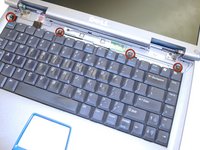
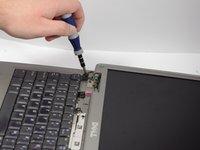
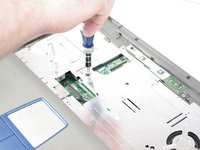
    • Using a Phillips screwdriver remove the four M2 x 3-mm screws holding in the keyboard.

    Ask FixBot
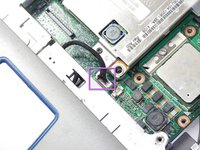
  4. Dell Inspiron 5100 PP07L CD Drive Replacement: step 4, image 1 of 1
    • Lift keyboard and detach the interface connector.

    • Take extra care when removing and handling the keyboard. The key caps on the keyboard are fragile and easily come off.

    Ask FixBot
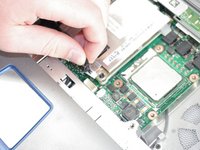
  5. Dell Inspiron 5100 PP07L CD Drive Replacement, Screen: step 5, image 1 of 2 Dell Inspiron 5100 PP07L CD Drive Replacement, Screen: step 5, image 2 of 2
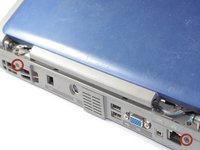
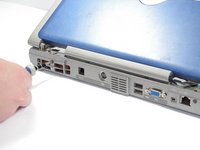
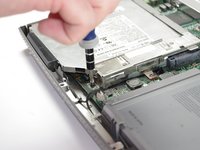
    • Using a Phillips screwdriver remove the two screws (5.8mm) located at the rear of the laptop.

    Ask FixBot
  6. Dell Inspiron 5100 PP07L CD Drive Replacement: step 6, image 1 of 1
    • Detach the screen connector.

    Ask FixBot
  7. Dell Inspiron 5100 PP07L CD Drive Replacement: step 7, image 1 of 2 Dell Inspiron 5100 PP07L CD Drive Replacement: step 7, image 2 of 2
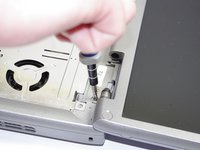
    • Using a Phillips screwdriver remove the four screws (5.8 mm) located at hinges of the screen.

    Ask FixBot
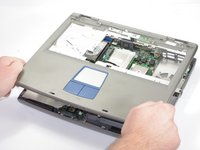
  8. Dell Inspiron 5100 PP07L CD Drive Replacement: step 8, image 1 of 1
    • Lift and remove display screen.

    Ask FixBot
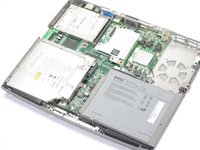
  9. Dell Inspiron 5100 PP07L CD Drive Replacement, CD Drive: step 9, image 1 of 2 Dell Inspiron 5100 PP07L CD Drive Replacement, CD Drive: step 9, image 2 of 2
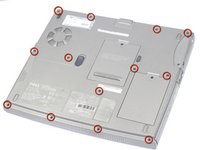
    • Flip to the back side of the laptop.

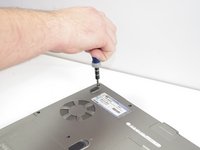
    • Remove thirteen screws (8.6mm).

    • If battery has not yet been removed, remove it now and remove single silver-colored screw at top of empty battery bay.

    Ask FixBot
  10. Dell Inspiron 5100 PP07L CD Drive Replacement: step 10, image 1 of 2 Dell Inspiron 5100 PP07L CD Drive Replacement: step 10, image 2 of 2
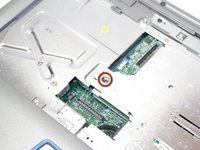
    • Remove one screw (8.6 mm) on metal plating.

    • Remove the metal plating.

    Ask FixBot
  11. Dell Inspiron 5100 PP07L CD Drive Replacement: step 11, image 1 of 1
    • Remove two screws (5.8mm)

    Ask FixBot
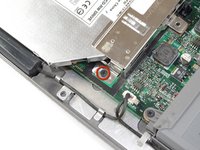
  12. Dell Inspiron 5100 PP07L CD Drive Replacement: step 12, image 1 of 2 Dell Inspiron 5100 PP07L CD Drive Replacement: step 12, image 2 of 2
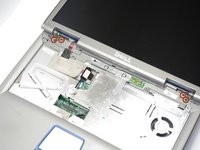
    • Disconnect cable.

    Ask FixBot
  13. Dell Inspiron 5100 PP07L CD Drive Replacement: step 13, image 1 of 2 Dell Inspiron 5100 PP07L CD Drive Replacement: step 13, image 2 of 2
    • Make sure that single silver-colored screw has been removed from empty battery bay

    • Remove top cover by lifting the edges upward.

    Ask FixBot
  14. Dell Inspiron 5100 PP07L CD Drive Replacement: step 14, image 1 of 2 Dell Inspiron 5100 PP07L CD Drive Replacement: step 14, image 2 of 2
    • Remove CD drive plating screw (5.8mm)

    Ask FixBot
  15. Dell Inspiron 5100 PP07L CD Drive Replacement: step 15, image 1 of 1
    • Slide outwards to remove

    Ask FixBot
Conclusion

To reassemble your device, follow these instructions in reverse order.

One other person completed this guide.

May Chauvin

Member since: 04/14/11

201 Reputation

6 Guides authored

Team

Cal Poly, Team 12-34, Maness Spring 2011 Member of Cal Poly, Team 12-34, Maness Spring 2011

CPSU-MANESS-S11S12G34

4 Members

6 Guides authored

0 Guide Comments

Add Comment

View Statistics:

Past 24 Hours: 0

Past 7 Days: 9

Past 30 Days: 71

All Time: 4,824