Free Shipping on Domestic Orders $75+

Dell Inspiron 3542 LCD screen replacement

What you need

  1. Dell Inspiron 3542 LCD screen replacement, Remove the battery: step 1, image 1 of 2 Dell Inspiron 3542 LCD screen replacement, Remove the battery: step 1, image 2 of 2
    • Remove the battery by pushing both clips out.

    • Remove the power supply.

    Ask FixBot

    Add Comment

  2. Dell Inspiron 3542 LCD screen replacement, Bezel removal: step 2, image 1 of 2 Dell Inspiron 3542 LCD screen replacement, Bezel removal: step 2, image 2 of 2
    Tool used on this step:
    Jimmy
    $7.95
    Buy
    • Use Jimmy or another opening tool to remove the screen bezel. Be careful not to damage the bezel.

    Ask FixBot

    Add Comment

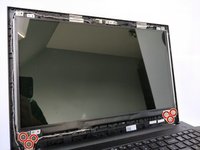
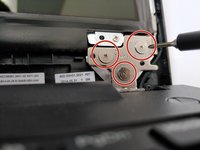
  3. Dell Inspiron 3542 LCD screen replacement, Screen removal: step 3, image 1 of 2 Dell Inspiron 3542 LCD screen replacement, Screen removal: step 3, image 2 of 2
    • Loosen the marked screws.

    Ask FixBot

    Add Comment

  4. Dell Inspiron 3542 LCD screen replacement, Screen removal: step 4, image 1 of 1
    • Remove the marked screws.

    Ask FixBot

    Add Comment

  5. Dell Inspiron 3542 LCD screen replacement, Screen removal: step 5, image 1 of 1
    • The screen can now be removed safely. You can put it screen down at your keyboard.

    • Be careful with the screen.

    • Be careful you don't break the cable connecting the screen.

    Ask FixBot

    Add Comment

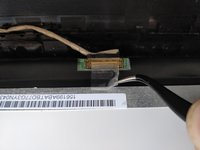
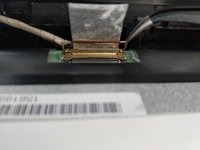
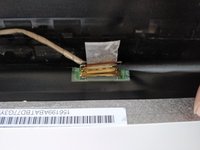
  6. Dell Inspiron 3542 LCD screen replacement, Cable removal: step 6, image 1 of 3 Dell Inspiron 3542 LCD screen replacement, Cable removal: step 6, image 2 of 3 Dell Inspiron 3542 LCD screen replacement, Cable removal: step 6, image 3 of 3
    Tool used on this step:
    Tweezers
    $3.99
    Buy
    • Remove the sticker holding the cable in place.

    • Use Tweezer to remove the safety holding the cable in place.

    • Use Spudger to remove the cable connecting the screen. Be careful whilst removing it.

    Ask FixBot

    Add Comment

Conclusion

Grab your new screen and do all the steps in reverse order.

Cancel: I did not complete this guide.

4 other people completed this guide.

Special thanks to these translators:

nl en

100%

These translators are helping us fix the world! Want to contribute?
Start translating ›

Ruben Debbaudt

Member since: 06/05/18

279 Reputation

1 Guide authored

0 Guide Comments

Add Comment

View Statistics:

Past 24 Hours: 4

Past 7 Days: 16

Past 30 Days: 42

All Time: 3,744