
Dell Inspiron 17R-N7110 RAM Replacement

Emily Cone and 4 other contributors
Last updated on Mar 7, 2024
Views: 1.8K
View statistics:
- Past 24 Hours:
- 1
- Past 7 Days:
- 13
- Past 30 Days:
- 72
- All Time:
- 1,789
Comments: 0
No one has left comments on this guide. Will you be first?
Go to guide commentsCompleted: 2 3
2 people have marked this guide "completed." Will you be next?
3 people have marked this guide "completed." Including you — great job!
Favorites: 0 1
No one has favorited (and subscribed to) this guide. Will you be the first?
1 person has favorited (and subscribed to) this guide — and that's you!
Introduction
Go to step 1 ↓This guide will walk you through removing and replacing your Dell Inspiron 17R-N7110 RAM stick(s). You will be handling delicate electronic components during this process, so be sure to wear the anti-static wrist strap for this replacement.
What you need
Tools


-
-
Tool used on this step:Anti-Static Wrist Strap$7.95
-
Place the laptop on a flat surface with the Dell logo upside down.
-
Flip the laptop over. The battery will be in the top center.
 Ask FixBot
-
-
-
Slide both the left lock and right lock, towards the center of the battery.
-
Push upwards on the grip on the bottom of the battery to remove it.
-
-
-
-
-
-
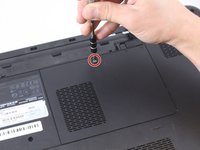
Using a Phillips #1 screwdriver, unscrew the .7mm screw at the top of the RAM compartment as pictured.
-
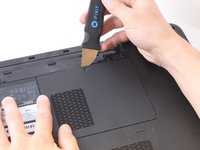
Use a metal Jimmy to pry open the RAM cover from the top of the compartment.
-
-
Tool used on this step:Anti-Static Wrist Strap$7.95
-
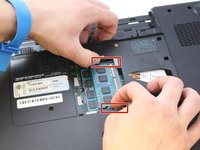
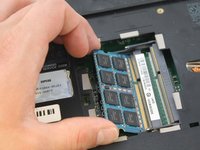
There are two small plastic prongs to the sides of the first RAM stick. Push the prongs away from each other to release the RAM stick.
-
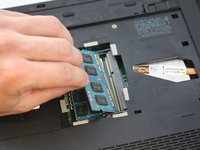
Gently remove the RAM stick.
-
If your laptop has a second RAM stick located underneath the first one, repeat this step to remove it.
-
-




To reassemble your device, follow these instructions in reverse order.
Cancel: I did not complete this guide.
2 other people completed this guide.

Team

Eastern Washington University, Team S1-G4, Carnegie Spring 2018 Member of Eastern Washington University, Team S1-G4, Carnegie Spring 2018
EWU-CARNEGIE-S18S1G4
4 Members
84 Guides authored
