
Dell Inspiron 1721 Keyboard Replacement

Jason Haddox and 2 other contributors
Last updated on Dec 13, 2019
Views: 583
View statistics:
- Past 24 Hours:
- 3
- Past 7 Days:
- 14
- Past 30 Days:
- 52
- All Time:
- 583
Comments: 0
No one has left comments on this guide. Will you be first?
Go to guide commentsCompleted: 2 3
2 people have marked this guide "completed." Will you be next?
3 people have marked this guide "completed." Including you — great job!
Favorites: 0 1
No one has favorited (and subscribed to) this guide. Will you be the first?
1 person has favorited (and subscribed to) this guide — and that's you!
Introduction
Go to step 1 ↓If your Dell Inspiron 1721 is not registering that certain keys are being pressed, or if you need access to other internal components, this guide will take you through the necessary steps to remove the keyboard.
Be sure the device is completely turned off before starting the removal process.
What you need
Tools


-
-
-
Slide tabs outward to undo the locks.
-
Grab and pull the battery away from the device to remove.
 Ask FixBot
-
-
-
-
-
-
Pry up on the corner of the hinge cover with an iFixit opening tool.
-
Use the iFixit opening tool along both sides and the front of the hinge cover to release it.
-
Lean the display back as far as it goes and lift up on the hinge cover to remove.
-
-
-
-
-
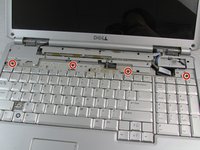
Remove four 3mm Phillips #1 screws from the top of the keyboard.
-
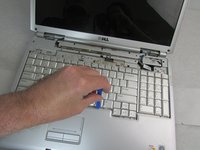
Use an iFixit opening tool to slide the keyboard upwards toward the display.
-
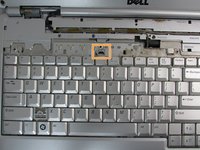
Slide the keyboard until it is clear of the lock tab, and lift it up to remove.
-
-


To reassemble your device, follow these instructions in reverse order.
Cancel: I did not complete this guide.
2 other people completed this guide.

Team

Embry-Riddle Aeronautical University, Team S8-G5, Salas Fall 2019 Member of Embry-Riddle Aeronautical University, Team S8-G5, Salas Fall 2019
ERAU-SALAS-F19S8G5
4 Members
108 Guides authored
