
Dell Inspiron 17-5749 Back Cover Replacement

Christopher Tran and 6 other contributors
Last updated on Jan 15, 2026
Views: 903
View statistics:
- Past 24 Hours:
- 1
- Past 7 Days:
- 15
- Past 30 Days:
- 68
- All Time:
- 903
Comments: 0
No one has left comments on this guide. Will you be first?
Go to guide commentsCompleted: 0 1
No one has marked this guide "completed." Will you be the first?
1 person has marked this guide "completed." It's you — great job!
Favorites: 0 1
No one has favorited (and subscribed to) this guide. Will you be the first?
1 person has favorited (and subscribed to) this guide — and that's you!
Better Introduction
Improve this guide by completing or revising its introduction.
What you need
Tools


-
-
Tool used on this step:Anti-Static Wrist Strap$7.95
-
Turn off power to the laptop.
-
Unplug the charging cable from the laptop.
 Ask FixBot
-
-
-
Switch each of the battery latches to the "unlocked" position.
-
Pull battery upwards by the tab to remove from the laptop.
-
-
-
-
-
-
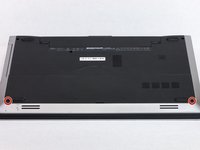
Remove the two 5.5mm screws that secure the base cover to the computer's base.
-
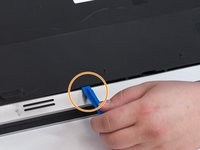
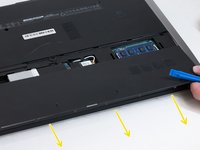
Using the plastic opening tool, carefully pry open the base cover starting from the center.
-
Lift the base cover upwards to remove and set it aside.
-
-


To reassemble your device, follow these instructions in reverse order.

Team

Washington State, Team S1-G2, Lobnitz Spring 2018 Member of Washington State, Team S1-G2, Lobnitz Spring 2018
WSU-LOBNITZ-S18S1G2
6 Members
144 Guides authored
