Free Shipping on Domestic Orders $75+

Dell Inspiron 17-3721 Fan Replacement

What you need

    1. Dell Inspiron 17-3721 Fan Replacement, Keyboard: step 1, image 1 of 2 Dell Inspiron 17-3721 Fan Replacement, Keyboard: step 1, image 2 of 2
      • Use a plastic opening tool or a metal spudger to pry out the tabs on top of the keyboard.

      • After prying the tabs up, carefully pull the keyboard out of the laptop.

      • Use caution when prying the tabs up or lifting the keyboard up, as the plastic material and the strip on the keyboard can easily break.

      Ask FixBot

      Add Comment

    2. Dell Inspiron 17-3721 Fan Replacement: step 2, image 1 of 2 Dell Inspiron 17-3721 Fan Replacement: step 2, image 2 of 2
      • Once the keyboard is lifted, locate the release tab.

      • Using a plastic opening tool or your finger, lift the tab so that it opens .

      • Once the tab is open, the strip on the keyboard can be removed.

      Ask FixBot

      Add Comment

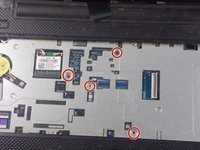
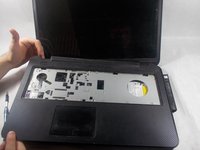
    1. Dell Inspiron 17-3721 Fan Replacement, Optical Drive: step 3, image 1 of 3 Dell Inspiron 17-3721 Fan Replacement, Optical Drive: step 3, image 2 of 3 Dell Inspiron 17-3721 Fan Replacement, Optical Drive: step 3, image 3 of 3
      • Remove the four 6 mm PH1 Philips head screws under the keyboard.

      • Carefully pop off the cover using the plastic opening tools and your hands.

      Ask FixBot

      Add Comment

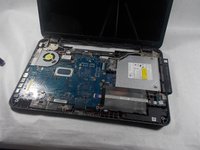
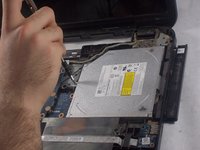
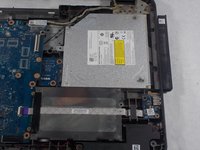
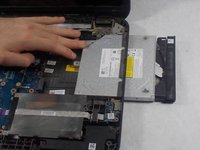
    2. Dell Inspiron 17-3721 Fan Replacement: step 4, image 1 of 3 Dell Inspiron 17-3721 Fan Replacement: step 4, image 2 of 3 Dell Inspiron 17-3721 Fan Replacement: step 4, image 3 of 3
      • Remove the 4 mm PH1 Philips head screw holding down the optical drive.

      • Use your hand to slide the drive out of the device.

      Ask FixBot

      Add Comment

    1. Dell Inspiron 17-3721 Fan Replacement, Fan: step 5, image 1 of 1
      • Remove the seven 6mm PH1 Philips head screws from the motherboard.

      • There may be more or less screws in your motherboard as the laptops do vary.

      Ask FixBot

      Add Comment

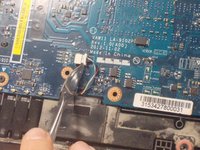
    2. Dell Inspiron 17-3721 Fan Replacement: step 6, image 1 of 2 Dell Inspiron 17-3721 Fan Replacement: step 6, image 2 of 2
      • Located on the lower left of the motherboard, disconnect the wire that connects the speaker by pushing it or pulling it away from the white box.

      Ask FixBot

      Add Comment

    3. Dell Inspiron 17-3721 Fan Replacement: step 7, image 1 of 1
      • Located on the lower right of the motherboard, flip up the black hatch and remove the ribbon cable by gently tugging it outwards.

      • Ribbon cables are very fragile and can tear easily. Handle with care.

      Ask FixBot

      Add Comment

    4. Dell Inspiron 17-3721 Fan Replacement: step 8, image 1 of 1
      • Remove the 4mm PH1 Philips screw to the right of the fan.

      Ask FixBot

      Add Comment

    5. Dell Inspiron 17-3721 Fan Replacement: step 9, image 1 of 1
      • Remove the 4mm PH1 Philips screw to the top of the fan.

      Ask FixBot

      Add Comment

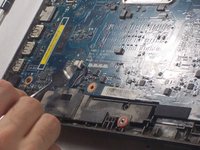
    6. Dell Inspiron 17-3721 Fan Replacement: step 10, image 1 of 1
      • Remove the motherboard from the USB sockets to the left by first pulling the motherboard to the right and then flip the motherboard up against the screen.

      Ask FixBot

      Add Comment

    7. Dell Inspiron 17-3721 Fan Replacement: step 11, image 1 of 1
      • Located on the lower left, remove the 4mm PH1 Philips screw to the top of the fan.

      Ask FixBot

      Add Comment

    8. Dell Inspiron 17-3721 Fan Replacement: step 12, image 1 of 2 Dell Inspiron 17-3721 Fan Replacement: step 12, image 2 of 2
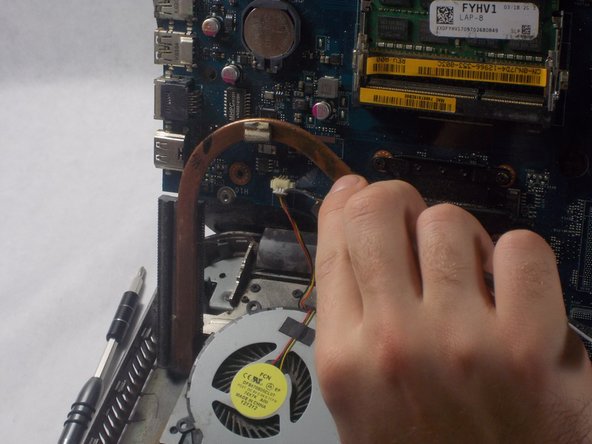
      • Remove the wire for the fan by pulling or pushing the white tab from the white box.

      Ask FixBot

      Add Comment

Conclusion

To reassemble your device, follow these instructions in reverse order.

Cancel: I did not complete this guide.

Kevin Prairie

Member since: 03/20/18

466 Reputation

4 Guides authored

Team

0 Guide Comments

Add Comment

View Statistics:

Past 24 Hours: 1

Past 7 Days: 15

Past 30 Days: 44

All Time: 1,510