Introduction
If the touchpad of your Dell Inspiron 16 5625 is not registering your touch, the touchpad may be the problem.
The touchpad may be damaged or stuck and it needs to be replaced.
What you need
-
-
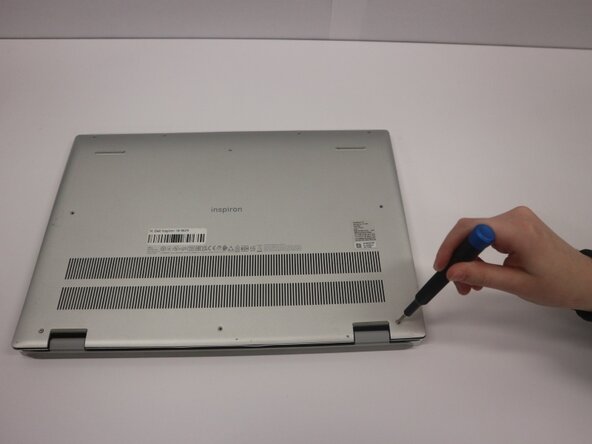
Remove the seven (M2x4) Phillips #0 screws securing the lower case.
-
Loosen the two (M2x7.5) captive Phillips #0 screws on the back cover by the hinges.
 Ask FixBot
-
-
-
Insert an opening pick into the seam between the lower case and chassis.
-
Pry around the entire perimeter of the lower case until it fully releases.
-
Remove the lower case.
-
-
-
Use your fingernails or two opening tools to gently "walk" the battery connector out of its socket.
-
-
-
-
Flip up the the locking flap securing the touchpad cable to the touchpad.
-
Disconnect the touchpad cable from the touchpad.
-
-
-
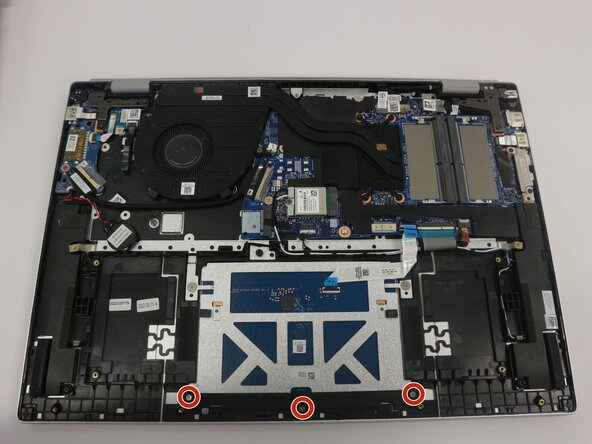
Remove the three (M1.6x2) Phillips #0 screws that secure the touchpad bracket to the palm rest and keyboard assembly.
-
Remove the bracket on the lower lip of the touchpad.
-
-
-
Remove the two (M2x1.8) Phillips 0 screws that connect the touchpad to the palm rest and keyboard assembly.
-





To reassemble your device, follow the above steps in reverse order.
Take your e-waste to an R2 or e-Stewards certified recycler.
Repair didn’t go as planned? Try some basic troubleshooting or ask our Answers community for help.

Team

Purdue University Northwest, Team 8-11, Dieterle Spring 2026 Member of Purdue University Northwest, Team 8-11, Dieterle Spring 2026
PNW-DIETERLE-S26S8G11
4 Members
5 Guides authored
