Introduction
Use this guide to replace the display assembly on a Dell Inspiron 16 5625.
What you need
-
-
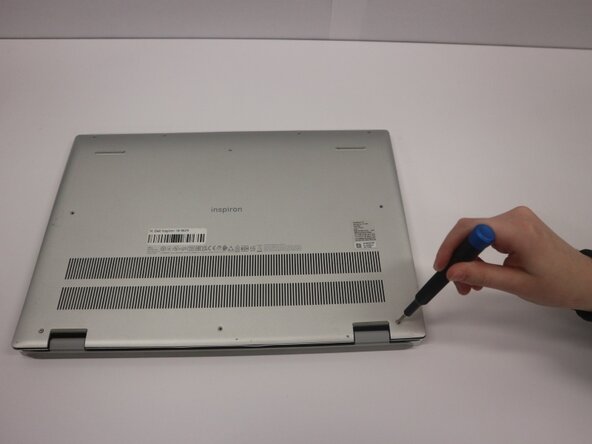
Remove the seven (M2x4) Phillips #0 screws securing the lower case.
-
Loosen the two (M2x7.5) captive Phillips #0 screws on the back cover by the hinges.
 Ask FixBot
-
-
-
Insert an opening pick into the seam between the lower case and chassis.
-
Pry around the entire perimeter of the lower case until it fully releases.
-
Remove the lower case.
-
-
-
-
Use your fingernails or two opening tools to gently "walk" the battery connector out of its socket.
-
-
-
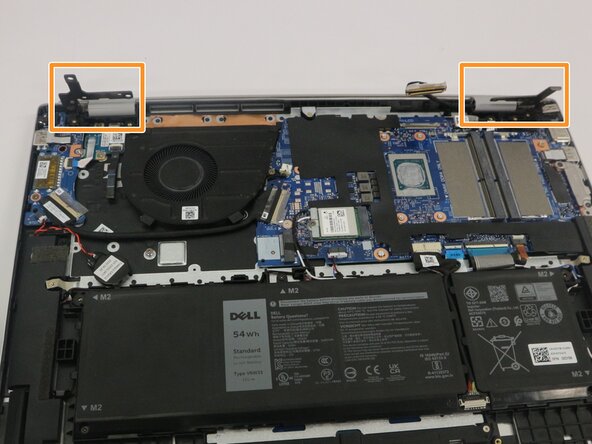
Remove the five (M2.5x5) Phillips #1 screws that secure both display hinges of the display assembly to the system board.
-
Open both display hinges to about a 90 degree angle.
-
-
-
Peel off the clear adhesive tape on the display connector.
-
Unlatch the connector's locking bar and disconnect the display cable from its socket.
-
Disconnect the display cable.
-
-
-
Gently lift the palm-rest and keyboard assembly off the display assembly and pull away from the hinges.
-





To reassemble your device, follow the above steps in reverse order.
Take your e-waste to an R2 or e-Stewards certified recycler.
Repair didn’t go as planned? Try some basic troubleshooting or ask our Answers community for help.

Team

Purdue University Northwest, Team 8-11, Dieterle Spring 2026 Member of Purdue University Northwest, Team 8-11, Dieterle Spring 2026
PNW-DIETERLE-S26S8G11
4 Members
5 Guides authored
