Free Shipping on Domestic Orders $75+

Dell Inspiron 15R 5520 Display Replacement

Views: 3.3K

View statistics:

Past 24 Hours:
2
Past 7 Days:
24
Past 30 Days:
102
All Time:
3,316
Comments: 0

No one has left comments on this guide. Will you be first?

Go to guide comments
Completed: 5

5 people have marked this guide "completed." Will you be next?

Favorites: 1

1 person has favorited (and subscribed to) this guide. Will you be next?

Time Required: 10 minutes
Difficulty: Moderate
Dell Inspiron 15R 5520 Display Replacement

Introduction

Go to step 1 ↓

This replacement guide will demonstrate how to safely remove and replace the Inspiron 15R 5520 display screen.

What you need

Tools

    1. Dell Inspiron 15R 5520 Display Replacement, Battery: step 1, image 1 of 1
      • We are removing the battery to avoid the possibility of an electrical discharge when working with this system.

      • Flip device on its back displaying the battery.

      Ask FixBot

      Add Comment

    2. Dell Inspiron 15R 5520 Display Replacement: step 2, image 1 of 3 Dell Inspiron 15R 5520 Display Replacement: step 2, image 2 of 3 Dell Inspiron 15R 5520 Display Replacement: step 2, image 3 of 3
      • Place a finger on both latches and push outwards.

      • Grab by the lip and pull upwards to remove battery.

      Ask FixBot

      Add Comment

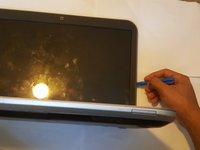
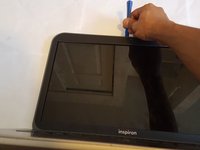
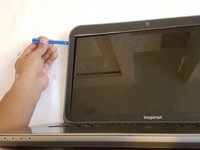
    1. Dell Inspiron 15R 5520 Display Replacement, Display: step 3, image 1 of 3 Dell Inspiron 15R 5520 Display Replacement, Display: step 3, image 2 of 3 Dell Inspiron 15R 5520 Display Replacement, Display: step 3, image 3 of 3
      • Lay the device as shown on table.

      • Use the plastic opening tool to separate the plastic casing on all sides.

      Ask FixBot

      Add Comment

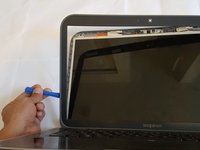
    2. Dell Inspiron 15R 5520 Display Replacement: step 4, image 1 of 2 Dell Inspiron 15R 5520 Display Replacement: step 4, image 2 of 2
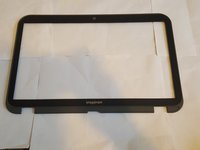
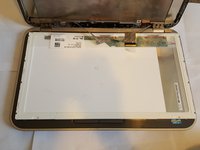
      • Remove casing for screen.

      Ask FixBot
      Add Comment

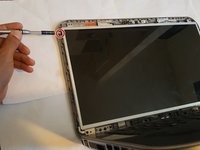
    3. Dell Inspiron 15R 5520 Display Replacement: step 5, image 1 of 3 Dell Inspiron 15R 5520 Display Replacement: step 5, image 2 of 3 Dell Inspiron 15R 5520 Display Replacement: step 5, image 3 of 3
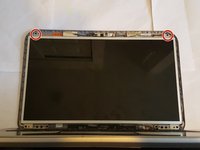
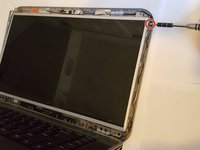
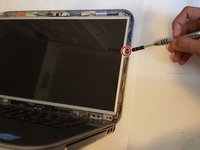
      • Locate and remove the top two 4mm screws.

      Ask FixBot
      Add Comment

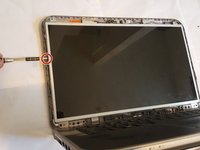
    4. Dell Inspiron 15R 5520 Display Replacement: step 6, image 1 of 3 Dell Inspiron 15R 5520 Display Replacement: step 6, image 2 of 3 Dell Inspiron 15R 5520 Display Replacement: step 6, image 3 of 3
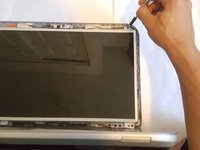
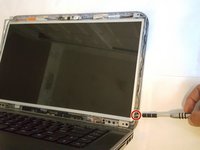
      • Locate and remove the three 3mm left hand side screws.

      Ask FixBot
      Add Comment

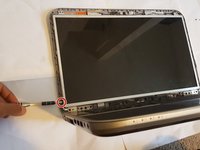
    5. Dell Inspiron 15R 5520 Display Replacement: step 7, image 1 of 3 Dell Inspiron 15R 5520 Display Replacement: step 7, image 2 of 3 Dell Inspiron 15R 5520 Display Replacement: step 7, image 3 of 3
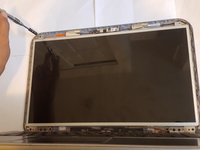
      • Locate and remove the three 3mm right hand side screws.

      Ask FixBot

      Add Comment

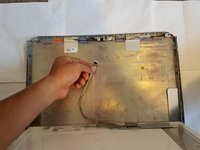
    6. Dell Inspiron 15R 5520 Display Replacement: step 8, image 1 of 3 Dell Inspiron 15R 5520 Display Replacement: step 8, image 2 of 3 Dell Inspiron 15R 5520 Display Replacement: step 8, image 3 of 3
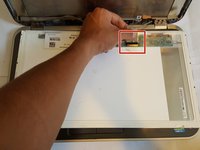
      • Lift the display up to reveal the cable behind it.

      • Pull the cable straight down.

      Ask FixBot

      Add Comment

    7. Dell Inspiron 15R 5520 Display Replacement: step 9, image 1 of 3 Dell Inspiron 15R 5520 Display Replacement: step 9, image 2 of 3 Dell Inspiron 15R 5520 Display Replacement: step 9, image 3 of 3
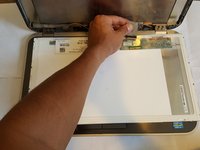
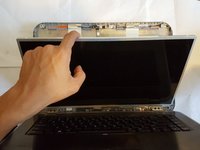
      • Sit the device upright and lay the display down on the keyboard.

      • Locate the cable on the base of the display.

      • Pull gently away from yourself.

      Ask FixBot

      Add Comment

    8. Dell Inspiron 15R 5520 Display Replacement: step 10, image 1 of 1
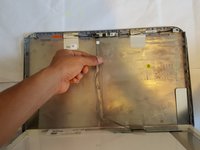
      • Remove screen.

      Ask FixBot
      Add Comment
Conclusion

To reassemble your device, follow these instructions in reverse order.

Cancel: I did not complete this guide.

5 other people completed this guide.

zAj

Member since: 09/15/16

484 Reputation

2 Guides authored

Team

USF Tampa, Team 18-1, Blackwell Fall 2016 Member of USF Tampa, Team 18-1, Blackwell Fall 2016

USFT-BLACKWELL-F16S18G1

3 Members

60 Guides authored

0 Guide Comments

Add Comment

View Statistics:

Past 24 Hours: 2

Past 7 Days: 24

Past 30 Days: 102

All Time: 3,316