
Dell Inspiron 1545 Hard Drive Replacement

Terrence15 and 2 other contributors
Last updated on Mar 24, 2022
Views: 7.3K
View statistics:
- Past 24 Hours:
- 5
- Past 7 Days:
- 26
- Past 30 Days:
- 117
- All Time:
- 7,284
Comments: 0
No one has left comments on this guide. Will you be first?
Go to guide commentsCompleted: 5 6
5 people have marked this guide "completed." Will you be next?
6 people have marked this guide "completed." Including you — great job!
Favorites: 0 1
No one has favorited (and subscribed to) this guide. Will you be the first?
1 person has favorited (and subscribed to) this guide — and that's you!
Community-Contributed Guide
An awesome member of our community made this guide. It was not created by iFixit staff.
Introduction
Go to step 1 ↓In this guide, we will be showing you how to remove and replace the Hard Drive.
What you need
Fix Kit
This kit contains all the parts and tools needed to complete this guide.

Parts

Tools

-
-
-
Remove the two screws securing the hard drive assembly to the computer base.
 Ask FixBot
-
-
-
Slide the hard drive assembly out of the bay.
-
-
-
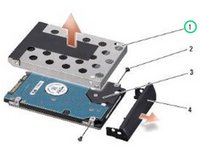
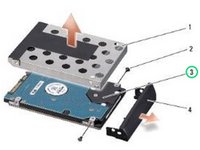
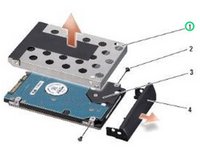
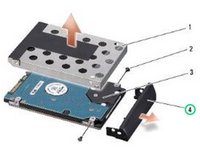
Remove the two screws (one from either side) securing the hard drive cage and bezel to the hard drive.
-
-
-
Replace the hard drive cage and the hard drive bezel.
-
-
-
-
Replace the two screws (one on either side) that secure the hard drive cage and bezel to the NEW hard drive.
-
-
-
Replace the two screws that secure the hard drive assembly to the computer base.
-
-






Cancel: I did not complete this guide.
5 other people completed this guide.


