
Dell Inspiron 1525 Hard Drive Replacement

Miroslav Djuric and 3 other contributors
Last updated on Nov 16, 2022
Views: 27K
View statistics:
- Past 24 Hours:
- 5
- Past 7 Days:
- 28
- Past 30 Days:
- 120
- All Time:
- 27,259
Comments: 0
No one has left comments on this guide. Will you be first?
Go to guide commentsCompleted: 10 11
10 people have marked this guide "completed." Will you be next?
11 people have marked this guide "completed." Including you — great job!
Favorites: 10 11
10 people have favorited (and subscribed to) this guide. Will you be next?
11 people have favorited (and subscribed to) this guide — including you!
Introduction
Go to step 1 ↓Use this guide to help you replace the hard drive in a Dell Inspiron 1525.
What you need
Fix Kit
This kit contains all the parts and tools needed to complete this guide.

Parts


Tools

-
-
-
Slide the battery release switch away from the lock symbol until you hear the battery click.
-
Slide the battery towards the back of the laptop until it comes free.
-
-
-
-
-
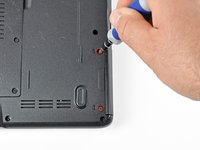
Remove the two 3.60 mm #1 Phillips screws securing the hard drive and hard drive tray.
-
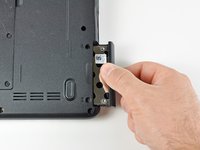
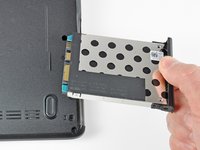
Slide the hard drive and hard drive tray out of the laptop.
-
-

 Ask FixBot


To reassemble your device, follow these instructions in reverse order.
Cancel: I did not complete this guide.
10 other people completed this guide.

