Free Shipping on Domestic Orders $75+

Dell Inspiron 1521 Bottom Panel Replacement

What you need

    1. Dell Inspiron 1521 Bottom Panel Replacement, Battery: step 1, image 1 of 1
      • Rotate the laptop so its bottom is facing up.

      Ask FixBot

      Add Comment

    2. Dell Inspiron 1521 Bottom Panel Replacement: step 2, image 1 of 3 Dell Inspiron 1521 Bottom Panel Replacement: step 2, image 2 of 3 Dell Inspiron 1521 Bottom Panel Replacement: step 2, image 3 of 3
      • Identify the lock mechanisms holding the battery in place.

      • Slide each button outward with your fingers to disengage the battery.

      • Pull the battery off with your hand to separate it from the laptop.

      Ask FixBot

      Add Comment

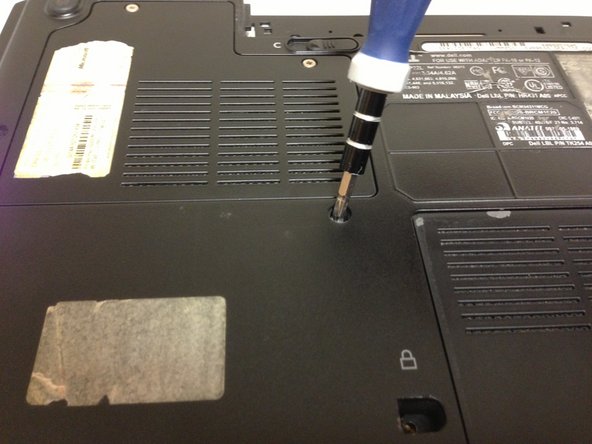
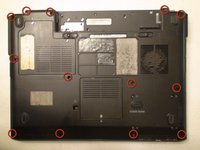
    1. Dell Inspiron 1521 Bottom Panel Replacement, Bottom Panel: step 3, image 1 of 2 Dell Inspiron 1521 Bottom Panel Replacement, Bottom Panel: step 3, image 2 of 2
      • Locate the thirteen 10 mm Phillips #1 screws securing the bottom panel of the laptop.

      • Remove the thirteen indicated screws with a Phillips #1 screwdriver.

      • With the screws removed you can now remove the panel underneath keyboard.

      Ask FixBot

      Add Comment

Conclusion

To reassemble your device, follow these instructions in reverse order.

Cancel: I did not complete this guide.

2 other people completed this guide.

Erik Sanchez

Member since: 09/26/12

21 Reputation

1 Guide authored

Team

Cal Poly, Team 15-47, Forte Fall 2012 Member of Cal Poly, Team 15-47, Forte Fall 2012

CPSU-FORTE-F12S15G47

5 Members

108 Guides authored

0 Guide Comments

Add Comment

View Statistics:

Past 24 Hours: 3

Past 7 Days: 8

Past 30 Days: 31

All Time: 1,468