Introduction
Taking out the battery is easy to replace when needed. It may need to be replaced if the battery dies quickly.
For your safety, discharge your battery below 25% before disassembling your device. This reduces the risk of a dangerous thermal event if the battery is accidentally damaged during the repair. If your battery is swollen, take appropriate precautions.
What you need
-
-
-
-
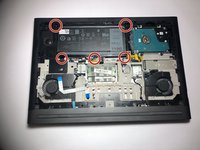
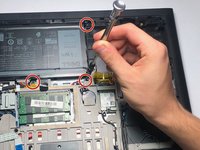
Remove the five 3mm screws on the battery with a Torx (T8) screwdriver in the locations shown.
-
-
Tool used on this step:Tweezers$4.99
-
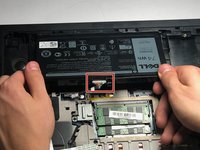
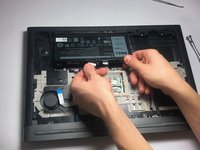
Disconnect the power cord from the battery by using a pair of tweezers, your fingers, or the opening tools from the iFixit pro tech tool kit.
-
Pinch the clips on the left and right side while pulling on the cord at the same time.
-

 Ask FixBot





To reassemble your device, follow these instructions in reverse order.
Cancel: I did not complete this guide.
3 other people completed this guide.

Team

Oregon Institute of Technology, Team S1-G1, Lancaster Fall 2018 Member of Oregon Institute of Technology, Team S1-G1, Lancaster Fall 2018
OIT-LANCASTER-F18S1G1
3 Members
60 Guides authored
