Free Shipping on Domestic Orders $75+

Dell Inspiron 15-7547 RAM Replacement

What you need

    1. Dell Inspiron 15-7547 RAM Replacement, Bottom Cover: step 1, image 1 of 1
      • Before you begin, be sure to turn off your laptop and unplug it from the outlet.

      • Close the display and flip the laptop on its back.

      • Loosen the ten 5.0 mm-long Phillips #0 screws.

      • The four screws marked with orange will remain captive to the cover.

      Ask FixBot

      Add Comment

    2. Dell Inspiron 15-7547 RAM Replacement: step 2, image 1 of 1
      • Use a spudger to pry up and loosen the back cover.

      • Remove the back cover.

      Ask FixBot

      Add Comment

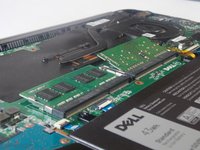
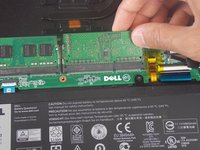
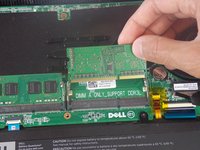
    1. Dell Inspiron 15-7547 RAM Replacement, RAM: step 3, image 1 of 3 Dell Inspiron 15-7547 RAM Replacement, RAM: step 3, image 2 of 3 Dell Inspiron 15-7547 RAM Replacement, RAM: step 3, image 3 of 3
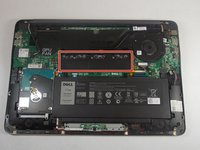
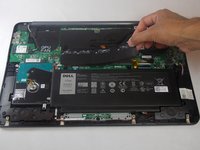
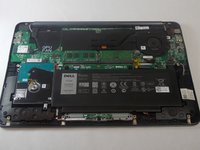
      • Remove the plastic heat spreader that covers the RAM sticks.

      Ask FixBot

      Add Comment

    2. Dell Inspiron 15-7547 RAM Replacement: step 4, image 1 of 2 Dell Inspiron 15-7547 RAM Replacement: step 4, image 2 of 2
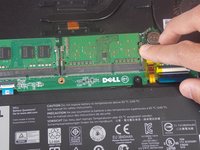
      • Release the clamps on each side of the RAM sticks by pushing away from the center.

      • When done properly the RAM stick should pop up.

      Ask FixBot

      Add Comment

    3. Dell Inspiron 15-7547 RAM Replacement: step 5, image 1 of 2 Dell Inspiron 15-7547 RAM Replacement: step 5, image 2 of 2
      • Pull the RAM stick in a straight line out of the socket.

      Ask FixBot

      Add Comment

Conclusion

To reassemble your device, follow these instructions in reverse order.

Cancel: I did not complete this guide.

0 Guide Comments

Add Comment

View Statistics:

Past 24 Hours: 0

Past 7 Days: 7

Past 30 Days: 34

All Time: 649