
Dell Inspiron 15-5552 Memory Replacement

Chandler Champion and 4 other contributors
Last updated on Jun 5, 2018
Views: 744
View statistics:
- Past 24 Hours:
- 2
- Past 7 Days:
- 16
- Past 30 Days:
- 65
- All Time:
- 744
Comments: 0
No one has left comments on this guide. Will you be first?
Go to guide commentsCompleted: 0 1
No one has marked this guide "completed." Will you be the first?
1 person has marked this guide "completed." It's you — great job!
Favorites: 0 1
No one has favorited (and subscribed to) this guide. Will you be the first?
1 person has favorited (and subscribed to) this guide — and that's you!
Needs Better Images
Better photos will improve this guide. Help out by taking, editing, or uploading new ones!
Markup Mishap
This guide needs better markups. Help out by correcting or making some markup annotations.
Introduction
Go to step 1 ↓The following guide will give instructions on how to properly replace the RAM/Memory on your Dell Inspiron 15-5552.
What you need
Tools

-
-
-
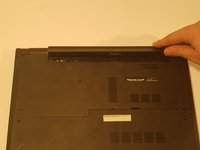
Slide the battery release switch away from the lock symbol towards the “unlock” position.
-
-
-
-
Rotate the battery outward by lifting the bottom lip that pops out.
-
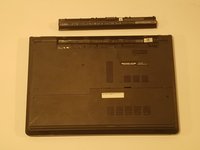
Continue rotating the battery towards the top of the laptop until the battery is completely removed.
-
-
-
-
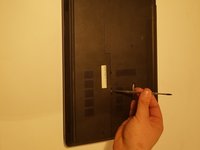
Use a J0 screwdriver to unscrew the two, 6mm Phillips screw on the rear-cover.
-
-
-
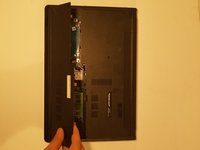
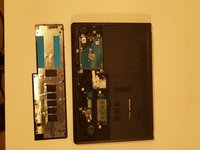
Using a spudger, Lightly lift the rear-cover up and at an angle, away from the computer.
-
-
-
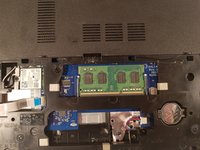
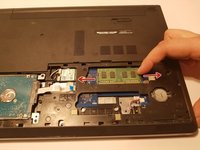
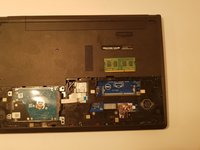
Use your fingers to carefully pull the securing clips on the RAM away from each other.
-
-
-
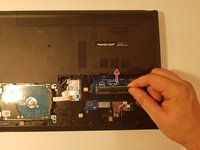
Remove the dislodged up RAM by pulling it away from the connection.
-

 Ask FixBot








To reassemble your device, follow these instructions in reverse order.

Team

Western Carolina University, Team S1-G4, Virtue Spring 2018 Member of Western Carolina University, Team S1-G4, Virtue Spring 2018
WCU-VIRTUE-S18S1G4
4 Members
60 Guides authored
