Introduction
This guide will show how to replace the RAM in a Dell Inspiron 15-5548 Laptop. RAM (random access memory) is the part of the computer that stores information from storage devices (hard drive, thumb drive) that is then sent to the computer’s central processing unit (CPU).
RAM could be the culprit of a myriad of computer issues including blue screens, random crashes, distorted graphics, and failure to turn on. If these issues are occurring, then replacement of the RAM might be necessary.
What you need
-
-
-
Turn the laptop over so that the grill for the fans is at the top. Locate the two screws above the grill.
-
Remove the screws with a Phillips 00 Screwdriver.
 Ask FixBot
-
-
-
-
Use the iFixit opening tool to lift up on the casing and remove it from the laptop.
-
-
-
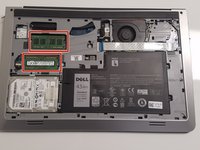
Locate the RAM sticks on the left side of the device.
-
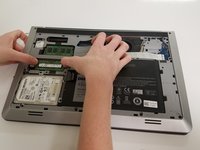
On both ends of the RAM stick, pull the metal tabs away from each other.
-
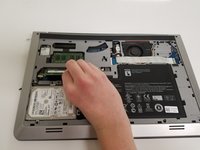
The RAM stick will pop up. Gently pull the RAM stick out.
-
-


To reassemble your device, follow these instructions in reverse order.

Team

University of North Texas, Team S7-G4, Thomas Fall 2017 Member of University of North Texas, Team S7-G4, Thomas Fall 2017
UNT-THOMAS-F17S7G4
4 Members
60 Guides authored
1 Guide Comment
Hi Mr Cotton. Greetings. I have a Dell Inspiron 5548. Can I replace the present 8GB ram with 32GB in any type of DDR4 laptop ram?
Please respond to lucien395@gmail.com
Thank you
