Introduction
This guide will explain how to replace a Dell Inspiron 15 7579 Laptop Touchpad if it no longer functions properly due to a mechanical malfunction, accidental damage, or normal wear and tear. It is important to make sure that the touchpad is actually the cause of the issue before using this guide. First, make sure that it is not a software issue by using Windows Update to check for any touchpad driver updates. You should also clean the touchpad using isopropyl alcohol on a microfiber cloth to make sure that the issue is not just caused by dirt or dust. If neither of these steps solve the issue, you should proceed with this guide.
Make sure that your device is unplugged and turned off before beginning the repair process. In addition, do not forget to follow any other safety guidance provided by Dell.
What you need
-
-
-
Use a Phillips #0 screwdriver to remove the ten 8 mm securing the bottom panel.
-
Lift the bottom panel up and off of the chassis.
 Ask FixBot
-
-
-
-
Use a Phillips #0 screwdriver to remove the four 3.7 mm screws securing the battery.
-
Lift the battery up and out.
-
-
-
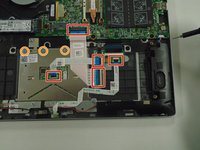
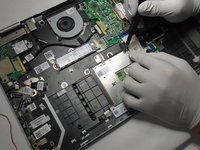
Use the tip of a spudger to flip up the locking bars on the five ZIF connectors, then pull the ribbon cables directly out of their ports.
-
Use a Phillips #0 screwdriver to remove the four 2.2 mm screws along the top of the touchpad.
-
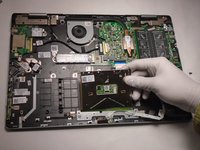
Lift the trackpad up and out.
-
-


To reassemble your device, follow these instructions in reverse order.
Cancel: I did not complete this guide.
2 other people completed this guide.

Team

The Citadel Military College of South Carolina, Team 7-11, Eggleston Spring 2022 Member of The Citadel Military College of South Carolina, Team 7-11, Eggleston Spring 2022
CMCSC-EGGLESTON-S22S7G11
3 Members
12 Guides authored
