Free Shipping on Domestic Orders $75+

Dell Inspiron 15 7560 Fan Replacement

What you need

    1. Dell Inspiron 15 7560 Fan Replacement, Fan: step 1, image 1 of 1
      • Power off the laptop.

      • Place the laptop with the bottom facing upwards.

      • Remove eight 5 mm screws from the bottom of the laptop.

      • Loosen the three captive screws.

      • Use an iFixit opening tool to pry the bottom cover away from the laptop.

      Ask FixBot

      Add Comment

    2. Dell Inspiron 15 7560 Fan Replacement: step 2, image 1 of 1
      • Remove the two screws from the fan.

      Ask FixBot

      Add Comment

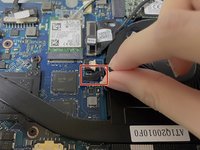
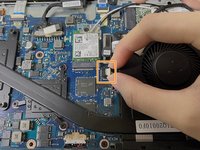
    3. Dell Inspiron 15 7560 Fan Replacement: step 3, image 1 of 2 Dell Inspiron 15 7560 Fan Replacement: step 3, image 2 of 2
      • Remove the black insulating tape from the fan connector.

      • Pinch the sides of the white fan connector with your thumb and index fingernail and pull it out of its socket.

      • Remove the fan from the laptop.

      • Save the insulating tape for reinstallation.

      Ask FixBot

      Add Comment

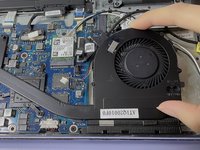
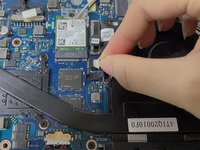
    4. Dell Inspiron 15 7560 Fan Replacement: step 4, image 1 of 2 Dell Inspiron 15 7560 Fan Replacement: step 4, image 2 of 2
      • Place the new fan in the laptop.

      • Plug the cable connector into its socket on the motherboard.

      • Replace the two screws around the fan.

      Ask FixBot

      Add Comment

    5. Dell Inspiron 15 7560 Fan Replacement: step 5, image 1 of 1
      • Before replacing the bottom cover, start the computer to check if the cooling fan is installed successfully.

      Ask FixBot

      Add Comment

    6. Dell Inspiron 15 7560 Fan Replacement: step 6, image 1 of 1
      • Power down the computer.

      • Reassemble the bottom cover.

      Ask FixBot

      Add Comment

Finish Line

Cancel: I did not complete this guide.

Kristen Gismondi

Member since: 11/12/14

108,497 Reputation

271 Guides authored

Team

iFixit Member of iFixit

Staff

123 Members

79,603 Guides authored

0 Guide Comments

Add Comment

View Statistics:

Past 24 Hours: 1

Past 7 Days: 7

Past 30 Days: 45

All Time: 1,412