Free Shipping on Domestic Orders $75+

Dell Inspiron 15 5565 Back Cover Replacement

What you need

  1. Dell Inspiron 15 5565 Back Cover Replacement, Optical Drive: step 1, image 1 of 1
    • Remove the 4 mm screw that secures the optical drive bracket to the optical drive using a Phillips #00 screwdriver.

    Ask FixBot

    Add Comment

  2. Dell Inspiron 15 5565 Back Cover Replacement: step 2, image 1 of 3 Dell Inspiron 15 5565 Back Cover Replacement: step 2, image 2 of 3 Dell Inspiron 15 5565 Back Cover Replacement: step 2, image 3 of 3
    • Eject the optical drive by pressing the eject button.

    • Push out the optical drive bracket using the iFixit opening tool.

    Ask FixBot

    Add Comment

  3. Dell Inspiron 15 5565 Back Cover Replacement, Back Cover: step 3, image 1 of 2 Dell Inspiron 15 5565 Back Cover Replacement, Back Cover: step 3, image 2 of 2
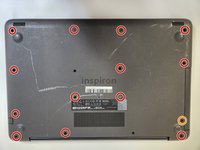
    • Remove 13 8 mm screws from the bottom of the device using a Phillips #00 screwdriver.

    • Remove the single 4 mm screw from the bottom of the device using a Phillips #00 screwdriver.

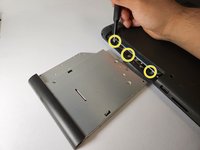
    • Remove the three 4 mm screws from the optical drive slot using a Phillips #00 screwdriver.

    Ask FixBot

    Add Comment

  4. Dell Inspiron 15 5565 Back Cover Replacement: step 4, image 1 of 2 Dell Inspiron 15 5565 Back Cover Replacement: step 4, image 2 of 2
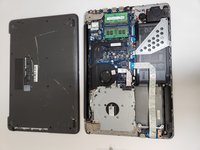
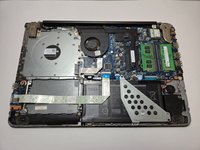
    • Remove the back cover from the laptop.

    Ask FixBot

    Add Comment

Conclusion

To reassemble your device, follow these instructions in reverse order.

Cancel: I did not complete this guide.

Kristen Gismondi

Member since: 11/12/14

107,659 Reputation

270 Guides authored

Team

iFixit Member of iFixit

Staff

122 Members

27,484 Guides authored

0 Guide Comments

Add Comment

View Statistics:

Past 24 Hours: 1

Past 7 Days: 11

Past 30 Days: 45

All Time: 429