Free Shipping on Domestic Orders $75+

Dell Inspiron 15 3559 Display Assembly Replacement

Views: 2.1K

View statistics:

Past 24 Hours:
2
Past 7 Days:
16
Past 30 Days:
73
All Time:
2,057
Comments: 0

No one has left comments on this guide. Will you be first?

Go to guide comments
Completed: 0

No one has marked this guide "completed." Will you be the first?

Favorites: 0

No one has favorited (and subscribed to) this guide. Will you be the first?

Time Required: 7 - 15 minutes
Difficulty: Moderate
Community-Contributed Guide

An awesome member of our community made this guide. It was not created by iFixit staff.

Dell Inspiron 15 3559 Display Assembly Replacement

Introduction

Go to step 1 ↓

In this guide, we will show you how to remove and replace the Display Assembly.

What you need

Tools

    1. Dell Inspiron 15 3559 Display Assembly Replacement, Turn the Computer Over: step 1, image 1 of 1
      Ask FixBot

      Add Comment

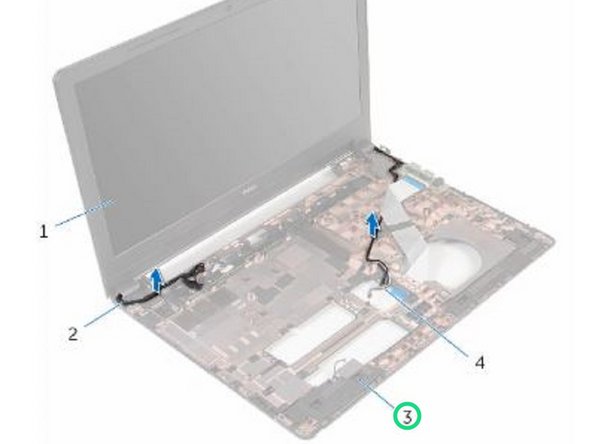
    2. Dell Inspiron 15 3559 Display Assembly Replacement, Noting the Cables: step 2, image 1 of 2 Dell Inspiron 15 3559 Display Assembly Replacement, Noting the Cables: step 2, image 2 of 2
      • Note the antenna cable routing and remove the antenna cables from its routing guides on the computer base.

      Ask FixBot

      Add Comment

    3. Dell Inspiron 15 3559 Display Assembly Replacement, Note the Display Cable Routing: step 3, image 1 of 1
      • Note the display cable routing and remove the cable from its routing guides on the computer base.

      Ask FixBot

      Add Comment

    4. Dell Inspiron 15 3559 Display Assembly Replacement, Remove the Screws: step 4, image 1 of 1
      • Remove the screws that secure the display hinges to the computer base.

      Ask FixBot

      Add Comment

    5. Dell Inspiron 15 3559 Display Assembly Replacement, Lifting the Display Assembly: step 5, image 1 of 1
      • Carefully lift the display assembly off the computer base.

      Ask FixBot

      Add Comment

    6. Dell Inspiron 15 3559 Display Assembly Replacement, Installing the new Display Assembly: step 6, image 1 of 1
      • Align the screw holes on the display hinges with the screw holes on the computer base.

      Ask FixBot

      Add Comment

    7. Dell Inspiron 15 3559 Display Assembly Replacement, Replace the Screws: step 7, image 1 of 1
      • Replace the screws that secure the display hinges to the computer base.

      Ask FixBot

      Add Comment

    8. Dell Inspiron 15 3559 Display Assembly Replacement, Route the Display Cable: step 8, image 1 of 2 Dell Inspiron 15 3559 Display Assembly Replacement, Route the Display Cable: step 8, image 2 of 2
      • Route the display cable through its routing guides on the computer base.

      Ask FixBot

      Add Comment

    9. Dell Inspiron 15 3559 Display Assembly Replacement, Routing the Antenna Cables: step 9, image 1 of 1
      • Route the antenna cables through its routing guides and slide the antenna cables through the slot on the computer base.

      Ask FixBot

      Add Comment

      • Close the display and turn the computer over.

      Ask FixBot

      Add Comment

Finish Line

Cancel: I did not complete this guide.

Terrence15

Member since: 12/18/17

80,143 Reputation

441 Guides authored

Team

RampUP America, Inc. Member of RampUP America, Inc.

Community

45 Members

12,349 Guides authored

0 Guide Comments

Add Comment

View Statistics:

Past 24 Hours: 2

Past 7 Days: 16

Past 30 Days: 73

All Time: 2,057