Introduction
Hello, this guide will inform you how to remove the hard drive from your Dell Inspiron 14R-5421.
Before working on your device, remember the electrostatic discharge (ESD) safety procedures before fixing your device.
Removing your hard drive is faster and easier than one may think, so I would recommend putting aside a least 5 minutes in your day to complete this guide.
If you need to remove a hard, you may have issues with hardware damage or failure, resulting in overheating, system crashes, and file corruption among other things.
If you have read this far, then you have just completed one of the first steps in solving a problem, which is to identify a solution, so proceed with the below steps.
What you need
-
-
-
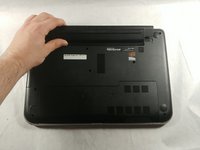
Start by removing the cover that hides all the internal components by sliding it in the direction shown
-
-
-
Now, remove the single screw that is securing the hard drive to the laptop noted by the red circle.
-
-
-
Now carefully lift then pull the hard drive out to the left until it detaches
-

 Ask FixBot




To reassemble your device, follow these instructions in reverse order.

Team

UMass Dartmouth, Team S4-G4, Covino Spring 2018 Member of UMass Dartmouth, Team S4-G4, Covino Spring 2018
UMASSD-COVINO-S18S4G4
3 Members
5 Guides authored
