
Dell Inspiron 1440 CD Drive Replacement

Tyler Lyons and 4 other contributors
Last updated on Jan 6, 2020
Views: 814
View statistics:
- Past 24 Hours:
- 2
- Past 7 Days:
- 15
- Past 30 Days:
- 62
- All Time:
- 814
Comments: 0
No one has left comments on this guide. Will you be first?
Go to guide commentsCompleted: 0 1
No one has marked this guide "completed." Will you be the first?
1 person has marked this guide "completed." It's you — great job!
Favorites: 0 1
No one has favorited (and subscribed to) this guide. Will you be the first?
1 person has favorited (and subscribed to) this guide — and that's you!
Introduction
Go to step 1 ↓This is a step that takes a little bit of time because it requires going inside of the Dell Inspiron 1440. Make sure to have a neat space to keep track of the different screws. Before following this guide to replace the CD drive in a Dell Inspiron you will need certain tools. A screwdriver is needed to complete this process. In addition to this you will need something that can “pry” the laptop dashboard off safely. These are important in order to not damage the product while trying to fix it.
What you need
Tools


-
-
-
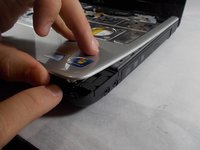
Take off the plastic strip with the speaker cover above the keyboard using an opening tool.
-
Once it pops out, pull it off.
 Ask FixBot
-
-
-
-
-
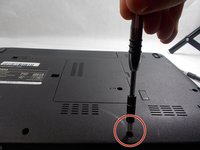
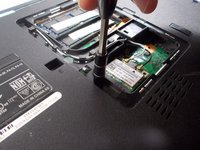
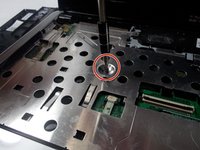
Remove the 6 mm screws that are in the silver metal plate under the keyboard.
-
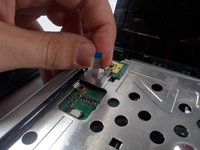
Disconnect any wires that are attached to the metal plate.
-
-
-
-
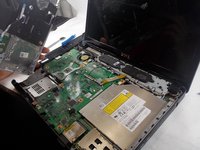
Once all of the screws are out of the silver plate and the bottom of the laptop, pull the silver plate, which is attached to the silver plastic on top, off of the laptop.
-
-
-
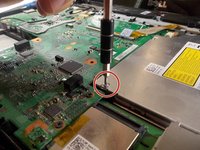
Remove the 3 mm screws from the CD drive.
-
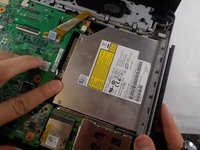
Push out on the top of the CD drive to the right.
-
Pull the CD drive all the way out.
-








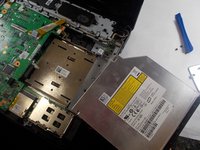
To reassemble your device, follow these instructions in reverse order.

Team

UMass Dartmouth, Team S1-G3, Barthe Fall 2019 Member of UMass Dartmouth, Team S1-G3, Barthe Fall 2019
UMASSD-BARTHE-F19S1G3
3 Members
60 Guides authored
