Free Shipping on Domestic Orders $75+

Dell Inspiron 1420 Disassembly

What you need

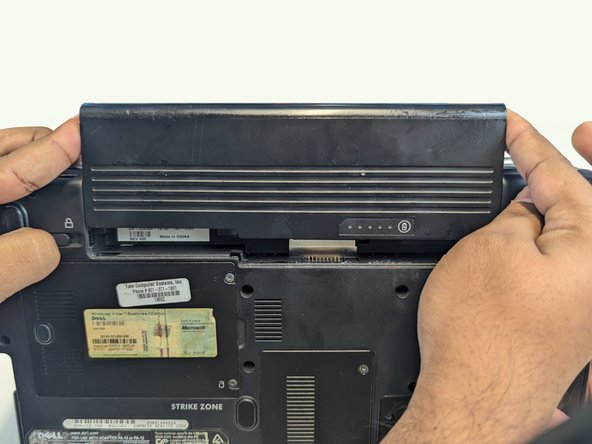
  1. Dell Inspiron 1420 Disassembly, Remove Battery: step 1, image 1 of 2 Dell Inspiron 1420 Disassembly, Remove Battery: step 1, image 2 of 2
    • Press both indicated locks on the bottom side of the laptop to release and remove the battery.

  2. Dell Inspiron 1420 Disassembly, Unscrew Back Panel Screws: step 2, image 1 of 2 Dell Inspiron 1420 Disassembly, Unscrew Back Panel Screws: step 2, image 2 of 2
    • Loosen and remove indicated screws on the back panel using a Phillips #1 screwdriver.

    • Back cover screws

    • These screws are a different length than the others and can be stored separately for reassembly.

    • Hard drive cover screws

    • RAM cover screws

    • CD drive cover screw

    • Heat sink cover screws

  3. Dell Inspiron 1420 Disassembly, Remove Hard Drive: step 3, image 1 of 1
    • Remove the hard drive cover.

    • Pull the tab in the direction of the arrows to remove the hard drive.

  4. Dell Inspiron 1420 Disassembly, Remove CD Drive: step 4, image 1 of 2 Dell Inspiron 1420 Disassembly, Remove CD Drive: step 4, image 2 of 2
    • Using a screwdriver, slide out the CD drive bracket enough for it to be grabbed.

    • Remove CD drive from housing.

  5. Dell Inspiron 1420 Disassembly, Remove RAM: step 5, image 1 of 2 Dell Inspiron 1420 Disassembly, Remove RAM: step 5, image 2 of 2
    • Remove RAM cover.

    • Pull the metal tabs above and below the RAM outward and remove both RAM sticks.

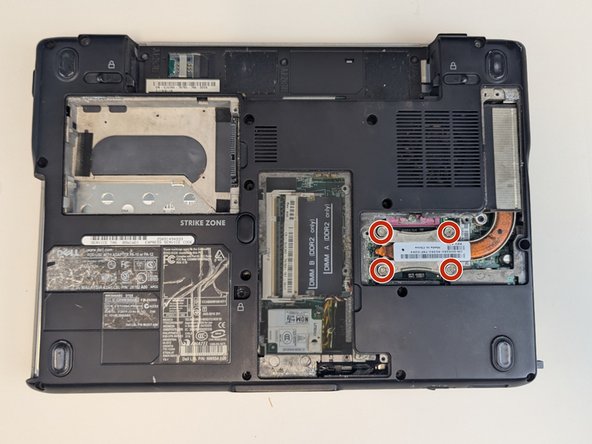
  6. Dell Inspiron 1420 Disassembly, Remove Heat Sink: step 6, image 1 of 3 Dell Inspiron 1420 Disassembly, Remove Heat Sink: step 6, image 2 of 3 Dell Inspiron 1420 Disassembly, Remove Heat Sink: step 6, image 3 of 3
    • Remove the heat sink cover.

    • Using a Phillips #1 screwdriver, loosen and remove screws from heat sink.

    • Remove the heat sink.

  7. Dell Inspiron 1420 Disassembly, Remove CPU: step 7, image 1 of 3 Dell Inspiron 1420 Disassembly, Remove CPU: step 7, image 2 of 3 Dell Inspiron 1420 Disassembly, Remove CPU: step 7, image 3 of 3
    • Using a flathead screwdriver, quarter turn the screw anticlockwise to release the CPU.

    • Gently lift the CPU out of the housing.

    • The pins on the bottom of the CPU are very fragile and will not function if any are bent.

  8. Dell Inspiron 1420 Disassembly, Remove Bracket: step 8, image 1 of 2 Dell Inspiron 1420 Disassembly, Remove Bracket: step 8, image 2 of 2
    • Using a Phillips #1 screwdriver, unscrew and remove bracket.

    • There may be a card along with the bracket in your machine. If there is, unplug and remove this card as well.

  9. Dell Inspiron 1420 Disassembly, Remove Back Screws: step 9, image 1 of 1
    • Using a Phillips #1 screwdriver, loosen and remove the indicated screws.

  10. Dell Inspiron 1420 Disassembly, Pry Control Panel: step 10, image 1 of 1
    • Use a spudger to pry off the control panel.

  11. Dell Inspiron 1420 Disassembly, Pry Hinge Covers: step 11, image 1 of 1
    • Use a spudger to pry off the hinge covers.

  12. Dell Inspiron 1420 Disassembly, Remove Keyboard Screws: step 12, image 1 of 1
    • Using a Phillips #1 screwdriver, loosen and remove the keyboard screws.

  13. Dell Inspiron 1420 Disassembly, Remove Keyboard: step 13, image 1 of 2 Dell Inspiron 1420 Disassembly, Remove Keyboard: step 13, image 2 of 2
    • Gently lift keyboard to reveal blue ribbon connection.

    • Use a spudger to flip the blue ribbon lever and release the keyboard.

  14. Dell Inspiron 1420 Disassembly, Remove Wifi-Card: step 14, image 1 of 2 Dell Inspiron 1420 Disassembly, Remove Wifi-Card: step 14, image 2 of 2
    • Using a Phillips #1 screwdriver, remove the screw holding in the Wi-Fi card.

    • Unplug cables connected to Wi-Fi card.

    • Slide Wi-Fi card out of connection to remove.

  15. Dell Inspiron 1420 Disassembly, Lift Control Panel: step 15, image 1 of 2 Dell Inspiron 1420 Disassembly, Lift Control Panel: step 15, image 2 of 2
    • Using a Phillips #1 screwdriver, loosen and remove control panel screw.

    • Carefully pull up control panel. Being sure to keep the cable attached, set to the side.

  16. Dell Inspiron 1420 Disassembly, Remove Monitor: step 16, image 1 of 2 Dell Inspiron 1420 Disassembly, Remove Monitor: step 16, image 2 of 2
    • Pull the blue tab up to release the monitor.

    • Remove monitor.

  17. Dell Inspiron 1420 Disassembly, Remove Screws: step 17, image 1 of 1
    • Using a Phillips #1 screwdriver, remove remaining screws from cover panel.

  18. Dell Inspiron 1420 Disassembly, Unplug Connections: step 18, image 1 of 3 Dell Inspiron 1420 Disassembly, Unplug Connections: step 18, image 2 of 3 Dell Inspiron 1420 Disassembly, Unplug Connections: step 18, image 3 of 3
    • Using a spudger, disconnect control panel motherboard cable.

    • Using a spudger, flip up blue lever and disconnect touchpad cable.

  19. Dell Inspiron 1420 Disassembly, Remove Screws and Connections: step 19, image 1 of 1
    • Lift off cover panel.

    • Using a Phillips #1 screwdriver, loosen and remove screws from motherboard.

    • Disconnect the indicated cables from the motherboard.

  20. Dell Inspiron 1420 Disassembly, Remove SIM Board: step 20, image 1 of 1
    • Using a Phillips #1 screwdriver, remove screw.

    • Disconnect indicated cable and remove SIM board.

  21. Dell Inspiron 1420 Disassembly, Remove Memory Card Holder: step 21, image 1 of 1
    • Slide memory card holder out of housing.

  22. Dell Inspiron 1420 Disassembly, Remove Modem Card: step 22, image 1 of 1
    • Flip laptop over to show backplate.

    • Loosen and remove modem card screw using a Phillips #1 screwdriver.

    • Remove modem card.

  23. Dell Inspiron 1420 Disassembly, Release Motherboard: step 23, image 1 of 2 Dell Inspiron 1420 Disassembly, Release Motherboard: step 23, image 2 of 2
    • Flip laptop over and gently pull motherboard away from backplate.

    • Disconnect the indicated connection to release the motherboard.

Conclusion

To reassemble your device, follow these instructions in reverse order.

3 other people completed this guide.

Braxton Quillin

Member since: 11/07/24

184 Reputation

1 Guide authored

0 Guide Comments

Add Comment

View Statistics:

Past 24 Hours: 1

Past 7 Days: 3

Past 30 Days: 31

All Time: 368