Free Shipping on Domestic Orders $75+

Dell Inspiron 1320 Hard Drive Replacement

Views: 721

View statistics:

Past 24 Hours:
3
Past 7 Days:
12
Past 30 Days:
77
All Time:
721
Comments: 0

No one has left comments on this guide. Will you be first?

Go to guide comments
Completed: 0

No one has marked this guide "completed." Will you be the first?

Favorites: 0

No one has favorited (and subscribed to) this guide. Will you be the first?

Time Required: 7 - 25 minutes
Difficulty: Easy
Community-Contributed Guide

An awesome member of our community made this guide. It was not created by iFixit staff.

Dell Inspiron 1320 Hard Drive Replacement

Introduction

Go to step 1 ↓

In this guide, we will show you how to remove and replace the Hard Drive.

What you need

Tools

    1. Dell Inspiron 1320 Hard Drive Replacement, Remove the Four Screws: step 1, image 1 of 1
      • WARNING: Before working inside your computer, read the safety information that shipped with your computer. Follow the procedures in Before You Begin.

      • CAUTION: To avoid electrostatic discharge, ground yourself by using a wrist grounding strap or by periodically touching an unpainted metal surface (such as a connector on your computer).

      • Remove the four screws that secure the hard drive assembly to the computer base.

      Ask FixBot

      Add Comment

    2. Dell Inspiron 1320 Hard Drive Replacement, Sliding the Hard Drive Assembly: step 2, image 1 of 1
      • Slide the hard drive assembly to disconnect it from the system board connector.

      Ask FixBot

      Add Comment

    3. Dell Inspiron 1320 Hard Drive Replacement, Pull the Black Pull-Tab: step 3, image 1 of 1
      • Pull the black pull-tab and lift the hard drive assembly out of the computer base.

      Ask FixBot

      Add Comment

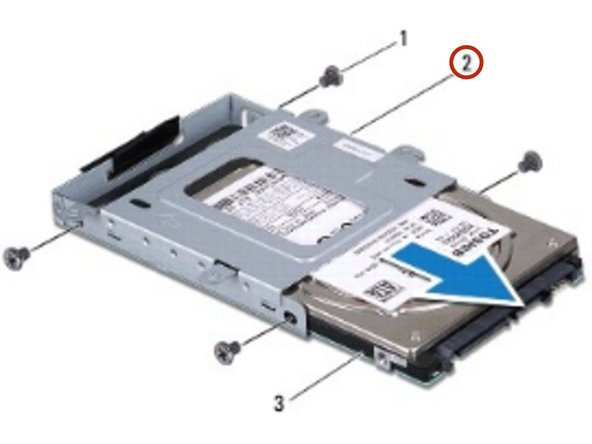
    4. Dell Inspiron 1320 Hard Drive Replacement, Remove the Screws: step 4, image 1 of 1
      • Remove the four screws that secure the hard drive to the hard drive cage.

      Ask FixBot

      Add Comment

    5. Dell Inspiron 1320 Hard Drive Replacement, Sliding the Hard Drive: step 5, image 1 of 1
      • Slide the hard drive out of the hard drive cage.

      Ask FixBot

      Add Comment

    6. Dell Inspiron 1320 Hard Drive Replacement, Sliding the Hard Drive: step 6, image 1 of 2 Dell Inspiron 1320 Hard Drive Replacement, Sliding the Hard Drive: step 6, image 2 of 2
      • Slide the NEW hard drive into the hard drive cage.

      Ask FixBot

      Add Comment

    7. Dell Inspiron 1320 Hard Drive Replacement, Replace the Screws: step 7, image 1 of 1
      • Replace the four screws that secure the hard drive to the hard drive cage.

      Ask FixBot

      Add Comment

    8. Dell Inspiron 1320 Hard Drive Replacement, Placing the Hard Drive Assembly: step 8, image 1 of 1
      • Place the hard drive assembly in the computer base.

      Ask FixBot

      Add Comment

    9. Dell Inspiron 1320 Hard Drive Replacement, Connecting the Hard Drive Assembly: step 9, image 1 of 1
      • Slide and connect the hard drive assembly to the system board connector.

      Ask FixBot

      Add Comment

    10. Dell Inspiron 1320 Hard Drive Replacement, Replace the Screws: step 10, image 1 of 1
      • Replace the four screws that secure the hard drive assembly to the computer base.

      Ask FixBot

      Add Comment

Finish Line

Cancel: I did not complete this guide.

Terrence15

Member since: 12/18/17

80,143 Reputation

441 Guides authored

Team

RampUP America, Inc. Member of RampUP America, Inc.

Community

45 Members

12,349 Guides authored

0 Guide Comments

Add Comment

View Statistics:

Past 24 Hours: 3

Past 7 Days: 12

Past 30 Days: 77

All Time: 721