Free Shipping on Domestic Orders $75+

Dell Inspiron 13-7347 Touchpad Replacement

What you need

    1. Dell Inspiron 13-7347 Touchpad Replacement, Battery: step 1, image 1 of 3 Dell Inspiron 13-7347 Touchpad Replacement, Battery: step 1, image 2 of 3 Dell Inspiron 13-7347 Touchpad Replacement, Battery: step 1, image 3 of 3
      • Flip the device over, so that the back is facing up.

      • Using a Phillips screwdriver, remove the 10 2.5mm x 8mm screws

      • Use the suction cup to lift off the back case.

      Ask FixBot

      Add Comment

    2. Dell Inspiron 13-7347 Touchpad Replacement: step 2, image 1 of 3 Dell Inspiron 13-7347 Touchpad Replacement: step 2, image 2 of 3 Dell Inspiron 13-7347 Touchpad Replacement: step 2, image 3 of 3
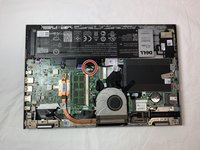
      • Remove the two 2mm x 3mm screws that secure the battery to the device.

      Ask FixBot

      Add Comment

    3. Dell Inspiron 13-7347 Touchpad Replacement: step 3, image 1 of 3 Dell Inspiron 13-7347 Touchpad Replacement: step 3, image 2 of 3 Dell Inspiron 13-7347 Touchpad Replacement: step 3, image 3 of 3
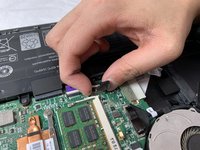
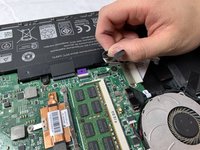
      • Unplug the cable that connects the USB / SD Reader IO Board to the motherboard.

      Ask FixBot

      Add Comment

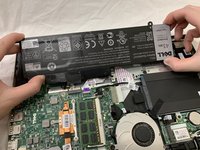
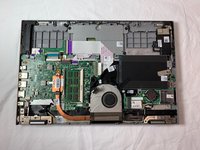
    4. Dell Inspiron 13-7347 Touchpad Replacement: step 4, image 1 of 3 Dell Inspiron 13-7347 Touchpad Replacement: step 4, image 2 of 3 Dell Inspiron 13-7347 Touchpad Replacement: step 4, image 3 of 3
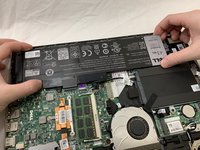
      • Lift the battery steadily from the device.

      • Tilt the battery upward while removing.

      Ask FixBot

      Add Comment

    1. Dell Inspiron 13-7347 Touchpad Replacement, Touchpad: step 5, image 1 of 2 Dell Inspiron 13-7347 Touchpad Replacement, Touchpad: step 5, image 2 of 2
      • Unplug the sliding connector.

      • The cord is extremely fragile.

      Ask FixBot

      Add Comment

    2. Dell Inspiron 13-7347 Touchpad Replacement: step 6, image 1 of 3 Dell Inspiron 13-7347 Touchpad Replacement: step 6, image 2 of 3 Dell Inspiron 13-7347 Touchpad Replacement: step 6, image 3 of 3
      • Flip the cord upward.

      Ask FixBot

      Add Comment

    3. Dell Inspiron 13-7347 Touchpad Replacement: step 7, image 1 of 2 Dell Inspiron 13-7347 Touchpad Replacement: step 7, image 2 of 2
      • Remove the four 2.5 mm JIS #00 screws.

      Ask FixBot

      Add Comment

    4. Dell Inspiron 13-7347 Touchpad Replacement: step 8, image 1 of 3 Dell Inspiron 13-7347 Touchpad Replacement: step 8, image 2 of 3 Dell Inspiron 13-7347 Touchpad Replacement: step 8, image 3 of 3
      • Flip the metal plate upward.

      • Take out the metal plate completely.

      Ask FixBot

      Add Comment

    5. Dell Inspiron 13-7347 Touchpad Replacement: step 9, image 1 of 3 Dell Inspiron 13-7347 Touchpad Replacement: step 9, image 2 of 3 Dell Inspiron 13-7347 Touchpad Replacement: step 9, image 3 of 3
      • Remove the touchpad by lifting up the handle.

      Ask FixBot

      Add Comment

Conclusion

To reassemble your device, follow these instructions in reverse order.

Cancel: I did not complete this guide.

lee120496

Member since: 02/05/19

643 Reputation

4 Guides authored

Team

UC Davis, Team S20-G8, Lore Winter 2019 Member of UC Davis, Team S20-G8, Lore Winter 2019

UCD-LORE-W19S20G8

3 Members

48 Guides authored

0 Guide Comments

Add Comment

View Statistics:

Past 24 Hours: 1

Past 7 Days: 10

Past 30 Days: 33

All Time: 775