Free Shipping on Domestic Orders $75+

Dell Inspiron 13 N3010 Display Assembly Replacement

What you need

  1. Dell Inspiron 13 N3010 Display Assembly Replacement, Remove the Screws: step 1, image 1 of 1
    • WARNING: Before working inside your computer, read the safety information that shipped with your computer. Follow the instructions in Before You Begin.

    • CAUTION: To avoid electrostatic discharge, ground yourself by using a wrist grounding strap or by periodically touching an unpainted metal surface (such as a connector on your computer).

    • Remove the two screws on the bottom of the computer that secure the display assembly to the computer base.

    Ask FixBot

    Add Comment

  2. Dell Inspiron 13 N3010 Display Assembly Replacement, Disconnecting the Display Cable: step 2, image 1 of 1
    • Open the display as far as possible.

    • Pull the pull-tab to disconnect the display cable from the connector on the system board.

    Ask FixBot

    Add Comment

  3. Dell Inspiron 13 N3010 Display Assembly Replacement, Remove the Display Cable: step 3, image 1 of 1
    • Remove the display cable grounding screw.

    • NOTE: Open the display at a 90-degree angle to the plane.

    Ask FixBot

    Add Comment

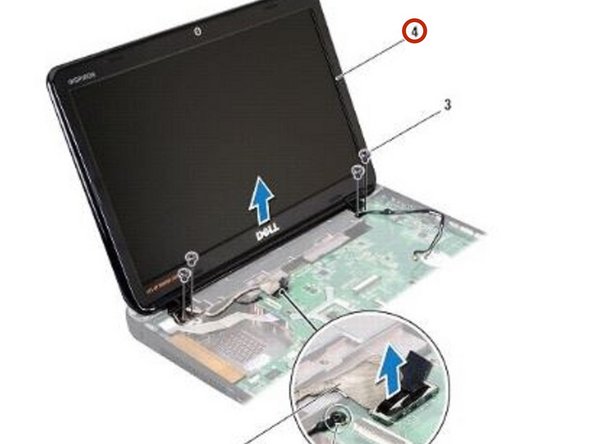
  4. Dell Inspiron 13 N3010 Display Assembly Replacement, Remove the Screws: step 4, image 1 of 1
    • In sequential order (indicated on the display hinge), remove the four screws that secure the display assembly to the computer base.

    Ask FixBot

    Add Comment

  5. Dell Inspiron 13 N3010 Display Assembly Replacement, Lifting the Display Assembly: step 5, image 1 of 1
    • Lift the display assembly off the computer.

    Ask FixBot

    Add Comment

  6. Dell Inspiron 13 N3010 Display Assembly Replacement, Placing the Display Assembly: step 6, image 1 of 1
    • Place the NEW display assembly in position.

    Ask FixBot

    Add Comment

  7. Dell Inspiron 13 N3010 Display Assembly Replacement, Replace the Screws: step 7, image 1 of 1
    • In sequential order (indicated on the display hinge), replace the four screws that secure the display assembly to the computer base.

    Ask FixBot

    Add Comment

  8. Dell Inspiron 13 N3010 Display Assembly Replacement, Connecting the Display Cable: step 8, image 1 of 1
    • Connect the display cable to the connector on the system board.

    Ask FixBot

    Add Comment

  9. Dell Inspiron 13 N3010 Display Assembly Replacement, Replace the Display Cable: step 9, image 1 of 1
    • Replace the display cable grounding screw.

    Ask FixBot

    Add Comment

  10. Dell Inspiron 13 N3010 Display Assembly Replacement, Replace the Screws: step 10, image 1 of 1
    • Turn the computer over and replace the two screws that secure the display assembly to the computer base.

    Ask FixBot

    Add Comment

Conclusion

To reassemble your device, follow these instructions in reverse order.

Cancel: I did not complete this guide.

One other person completed this guide.

Terrence15

Member since: 12/18/17

80,125 Reputation

441 Guides authored

Team

RampUP America, Inc. Member of RampUP America, Inc.

Community

45 Members

2,003 Guides authored

0 Guide Comments

Add Comment

View Statistics:

Past 24 Hours: 0

Past 7 Days: 3

Past 30 Days: 24

All Time: 598