
Dell Inspiron 11z-1121 RAM Replacement

Jerativat Satayarekha and 3 other contributors
Last updated on Apr 4, 2020
Views: 858
View statistics:
- Past 24 Hours:
- 3
- Past 7 Days:
- 20
- Past 30 Days:
- 88
- All Time:
- 858
Comments: 0
No one has left comments on this guide. Will you be first?
Go to guide commentsCompleted: 0 1
No one has marked this guide "completed." Will you be the first?
1 person has marked this guide "completed." It's you — great job!
Favorites: 0 1
No one has favorited (and subscribed to) this guide. Will you be the first?
1 person has favorited (and subscribed to) this guide — and that's you!
Introduction
Go to step 1 ↓RAM is used whenever any sort of application is open on your computer. The more applications that are open, the more RAM that is being used. If you find that your computer is not capable of running apps at decent speed then replacing the RAM can help fix that issue.
What you need
Tools


-
-
-
Slide the latches outward to release the battery.
-
Pull the battery outward to remove.
 Ask FixBot
-
-
-
-
-
-
With a Phillips #1, loosen the 1 mm screw attaching the access door to the laptop body
-
Using your fingers, remove the access door to expose the memory card
-
-
-
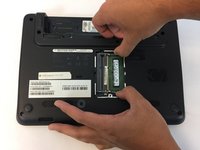
To access the memory card, push out the lashes on the left and the right of the memory card.
-
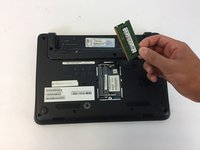
To remove the memory card, use your fingers to pull it out with the lashes still stretched out.
-
-


To reassemble your device, follow these instructions in reverse order.

Team

USF Tampa, Team 1-5, Nance Fall 2016 Member of USF Tampa, Team 1-5, Nance Fall 2016
USFT-NANCE-F16S1G5
4 Members
60 Guides authored
