Introduction
In this guide, you will be replacing the battery to your Dell Inspiron. When finished, you should understand how to dissemble the back panel and remove the battery.
What you need
-
-
-
Remove all nine 5mm Phillips head screws from the back cover using #0 Phillips head.
-
-
-
Gently use a spudger to pull the cover away from the rest of the laptop. The cover will come off after you use the tool on two or three sides.
-
-
-
-
-
After taking off the back panel, you will see the battery located at the bottom of the computer system. It's black and is clearly labeled "dell battery".
-
-
-
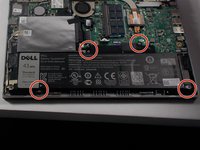
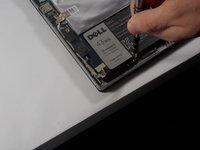
Locate the battery at the bottom of the computer and remove the four 3mm screws with a Phillips #0 head that hold the battery down.
-
-
-
Remove the Solid State Drive wire from the battery clip by detaching the wire.
-
This can be done by gently pulling the connector away from the battery clip.
-
-
-
Remove the battery from the computer system by gently lifting it from the side.
-
-


 Ask FixBot




To reassemble your device, follow these instructions in reverse order.
Cancel: I did not complete this guide.
One other person completed this guide.

Team

UMass Dartmouth, Team 4-6, Catania Spring 2016 Member of UMass Dartmouth, Team 4-6, Catania Spring 2016
UMASSD-CATANIA-S16S4G6
3 Members
67 Guides authored
