Free Shipping on Domestic Orders $75+

Dell Inspiron 11 3169 Display Assembly Replacement

What you need

  1. Dell Inspiron 11 3169 Display Assembly Replacement, Remove the Screw: step 1, image 1 of 1
    Ask FixBot

    Add Comment

  2. Dell Inspiron 11 3169 Display Assembly Replacement, Lifting the Display-Cable: step 2, image 1 of 1
    • Lift the display-cable bracket off the system board.

    Ask FixBot

    Add Comment

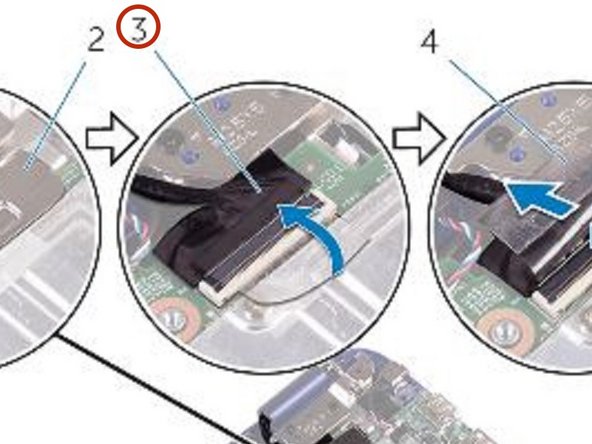
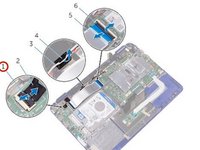
  3. Dell Inspiron 11 3169 Display Assembly Replacement, Peeling off the Tape: step 3, image 1 of 2 Dell Inspiron 11 3169 Display Assembly Replacement, Peeling off the Tape: step 3, image 2 of 2
    • Peel off the tape to access the display cable.

    Ask FixBot

    Add Comment

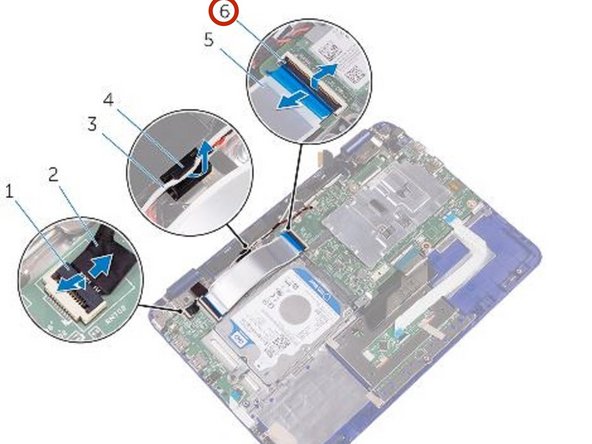
  4. Dell Inspiron 11 3169 Display Assembly Replacement, Open the Latch: step 4, image 1 of 1
    • Open the latch and disconnect the display cable.

    Ask FixBot

    Add Comment

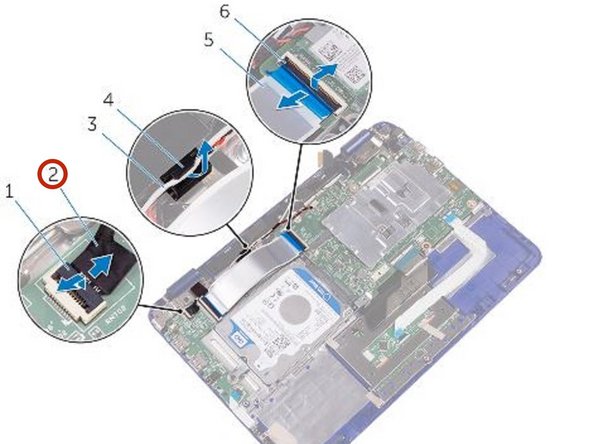
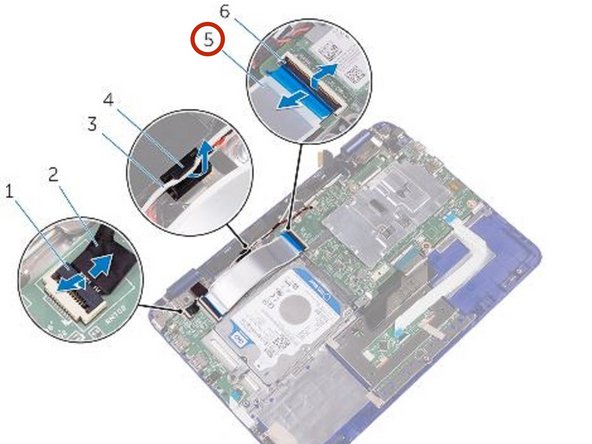
  5. Dell Inspiron 11 3169 Display Assembly Replacement, Open the Latch: step 5, image 1 of 3 Dell Inspiron 11 3169 Display Assembly Replacement, Open the Latch: step 5, image 2 of 3 Dell Inspiron 11 3169 Display Assembly Replacement, Open the Latch: step 5, image 3 of 3
    • Open the latch and disconnect the sensor-board cable from the I/O board.

    Ask FixBot

    Add Comment

  6. Dell Inspiron 11 3169 Display Assembly Replacement, Peeling the Tapes: step 6, image 1 of 1
    • Peel the tapes off the display hinges.

    Ask FixBot

    Add Comment

  7. Dell Inspiron 11 3169 Display Assembly Replacement, Opening the Display: step 7, image 1 of 1
    • Turn the computer over and open the display as far as possible.

    • CAUTION: Place the computer on a soft and clean surface to avoid scratching the display.

    Ask FixBot

    Add Comment

  8. Dell Inspiron 11 3169 Display Assembly Replacement, Remove the Screws: step 8, image 1 of 1
    • Place the computer face down on a flat surface.

    • Remove the screws that secure the display assembly to the palm-rest and keyboard assembly.

    Ask FixBot

    Add Comment

  9. Dell Inspiron 11 3169 Display Assembly Replacement, Lifting the Display Assembly: step 9, image 1 of 1
    • Lift the display assembly off the palm-rest and keyboard assembly.

    Ask FixBot

    Add Comment

  10. Dell Inspiron 11 3169 Display Assembly Replacement, Placing the Display Assembly: step 10, image 1 of 1
    • CAUTION: Place the computer on a soft and clean surface to avoid scratching the display.

    • Place the display assembly on the palm-rest and keyboard assembly.

    Ask FixBot

    Add Comment

  11. Dell Inspiron 11 3169 Display Assembly Replacement, Align the Screw Holes: step 11, image 1 of 1
    • Align the screw holes on the display hinges with the screw holes on the palm-rest and keyboard assembly.

    Ask FixBot

    Add Comment

  12. Dell Inspiron 11 3169 Display Assembly Replacement, Replace the Screws: step 12, image 1 of 1
    • Replace the screws that secure the display assembly to the palm-rest and keyboard assembly.

    Ask FixBot

    Add Comment

  13. Dell Inspiron 11 3169 Display Assembly Replacement, Sliding the I/O Board Cable: step 13, image 1 of 2 Dell Inspiron 11 3169 Display Assembly Replacement, Sliding the I/O Board Cable: step 13, image 2 of 2
    • Turn the computer over and close the display.

    • Slide the I/O-board cable into its slot on the system board and press down the latch to secure the cable.

    Ask FixBot

    Add Comment

  14. Dell Inspiron 11 3169 Display Assembly Replacement, Routing the Antenna Cable: step 14, image 1 of 1
    • Route the antenna cable through its routing on the right speaker.

    Ask FixBot

    Add Comment

  15. Dell Inspiron 11 3169 Display Assembly Replacement, Sliding the Sensor-Board Cable: step 15, image 1 of 2 Dell Inspiron 11 3169 Display Assembly Replacement, Sliding the Sensor-Board Cable: step 15, image 2 of 2
    • Slide the sensor-board cable into its slot on the I/O board and press down the latch to secure the cable.

    Ask FixBot

    Add Comment

  16. Dell Inspiron 11 3169 Display Assembly Replacement, Sliding the Display Cable: step 16, image 1 of 1
    • Slide the display cable into its slot on the system board and press down the latch to secure the cable.

    Ask FixBot

    Add Comment

  17. Dell Inspiron 11 3169 Display Assembly Replacement, Adhering the Tape: step 17, image 1 of 1
    • Adhere the tape on the display cable.

    Ask FixBot

    Add Comment

Conclusion

To reassemble your device, follow these instructions in reverse order.

Cancel: I did not complete this guide.

Terrence15

Member since: 12/18/17

80,125 Reputation

441 Guides authored

Team

RampUP America, Inc. Member of RampUP America, Inc.

Community

45 Members

2,003 Guides authored

0 Guide Comments

Add Comment

View Statistics:

Past 24 Hours: 2

Past 7 Days: 4

Past 30 Days: 20

All Time: 542