Introduction
You should know how to remove back cover before you can proceed with this guide. Be very cautious after removing the back cover because you could damage the sensitive electronic components with static electricity.
What you need
-
-
-
Remove the (10) P58F black screws on the back cover using the Phillips #0 screwdriver.
-
After removing the screws, remove the back cover using a plastic or metal spudger.
 Ask FixBot
-
-
-
-
-
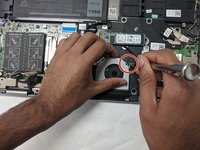
Use a plastic opening tool to unclip the connector that attaches the fan to the motherboard.
-
-
-
-
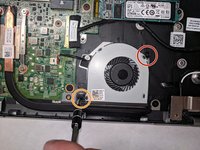
Remove the 3.7mm long screws holding the fan in place with a Phillips #0 screwdriver.
-
Remove the second 3.7mm long screws holding the fan in place with a Phillips #0 screwdriver.
-
-



To reassemble your device, follow these instructions in reverse order.
Cancel: I did not complete this guide.
One other person completed this guide.

Team

IUPUI, Team S2-G1, Harley Spring 2019 Member of IUPUI, Team S2-G1, Harley Spring 2019
IUPUI-HARLEY-S19S2G1
3 Members
24 Guides authored
