Free Shipping on Domestic Orders $75+

Dell Alienware M17x R3 Battery Pack Replacement

What you need

    1. Dell Alienware M17x R3 Battery Pack Replacement, Turning Over the Computer: step 1, image 1 of 1
      • WARNING: Before working inside your computer, read the safety information that shipped with your computer.

      • CAUTION: To avoid electrostatic discharge, ground yourself by using a wrist grounding strap or by periodically touching an unpainted metal surface (such as a connector on your computer).

      • CAUTION: To avoid damage to the computer, use only the battery designed for this particular Alienware computer. Do not use batteries designed for other Alienware computers.

      • Shut down the computer and turn it over.

      Ask FixBot

      Add Comment

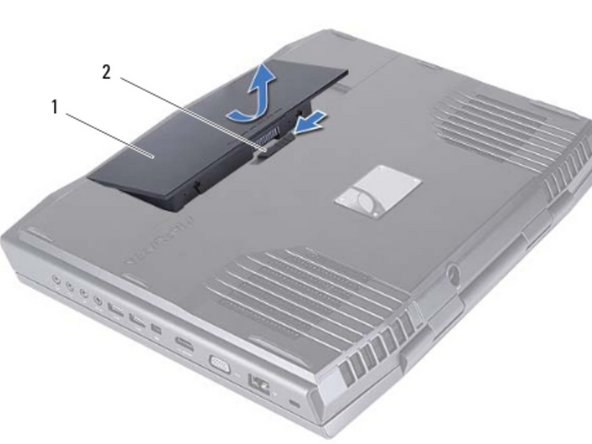
    2. Dell Alienware M17x R3 Battery Pack Replacement, Popping Out the Battery Pack: step 2, image 1 of 2 Dell Alienware M17x R3 Battery Pack Replacement, Popping Out the Battery Pack: step 2, image 2 of 2
      • Slide the battery latch to the unlock position as shown. The battery pack pops up.

      Ask FixBot

      Add Comment

    3. Dell Alienware M17x R3 Battery Pack Replacement, Removing the Battery Pack: step 3, image 1 of 1
      • Remove the battery pack.

      Ask FixBot

      Add Comment

    4. Dell Alienware M17x R3 Battery Pack Replacement, Align the Tabs: step 4, image 1 of 1
      • Align the tabs on the NEW battery with the slots on the battery bay and snap the battery into place.

      Ask FixBot

      Add Comment

Conclusion

To reassemble your device, follow these instructions in reverse order.

Cancel: I did not complete this guide.

One other person completed this guide.

Terrence15

Member since: 12/18/17

80,125 Reputation

441 Guides authored

Team

RampUP America, Inc. Member of RampUP America, Inc.

Community

45 Members

12,136 Guides authored

0 Guide Comments

Add Comment

View Statistics:

Past 24 Hours: 0

Past 7 Days: 4

Past 30 Days: 33

All Time: 1,162