
Dell Alienware 15 R3 Wi-Fi Card Replacement

Jake Nelson and 2 other contributors
Last updated on Mar 9, 2023
Views: 1.1K
View statistics:
- Past 24 Hours:
- 3
- Past 7 Days:
- 24
- Past 30 Days:
- 81
- All Time:
- 1,100
Comments: 4
4 comments on steps.
Completed: 0 1
No one has marked this guide "completed." Will you be the first?
1 person has marked this guide "completed." It's you — great job!
Favorites: 0 1
No one has favorited (and subscribed to) this guide. Will you be the first?
1 person has favorited (and subscribed to) this guide — and that's you!
Action Shots
Be an action hero! This guide needs images that better demonstrate how to perform specific actions.
Needs More Images
A few more images would make this guide's procedures crystal clear.
Inconsistent Images
Updating the images on this guide to be more consistent with the prerequisites would increase its awesomeness.
Better Introduction
Improve this guide by completing or revising its introduction.
Introduction
Go to step 1 ↓If you need to replace the Wi-Fi card from your Dell Alienware 15 R3, follow this guide.
What you need
Tools
-
Spudger4.9


-
-
-
Flip the laptop over so that the backside is facing up.
-
Use a Phillips #00 screwdriver to remove the six 13.0 mm screws from the sides of the back case.
-
Use a Phillips #00 screwdriver to remove one 5.0 mm screw from the back of the laptop.
 Ask FixBot
-
-
-
Use the opening tool to pry the back case from the computer.
-
Use the opening tool and work your way around the perimeter of the back case to gently release the clips.
-
Lift the back case off of the laptop.
-
-
-
-
-
Use a Phillips #00 screwdriver to remove two screws from the side of the laptop.
-
-
-
Use an opening tool to release the four tabs from the hinge cover and gently pry it off.
-
-
-
-
Use a Phillips #00 screwdriver to remove 10 screws from the chassis.
-
Use a spudger or opening tool to remove the chassis and reveal the battery, fan, motherboard, and other components.
-
-
-
-
-
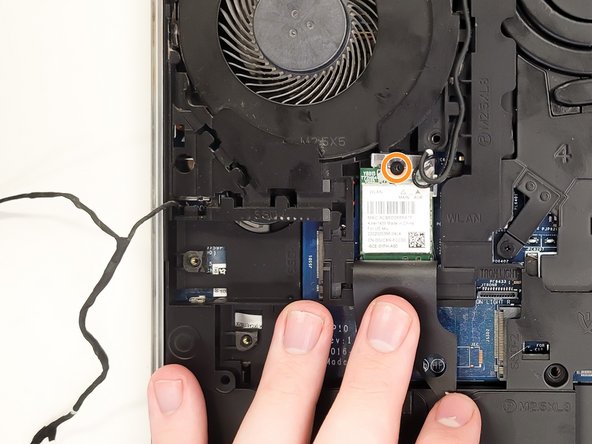
Open the flap to reveal the Wi-Fi card.
-
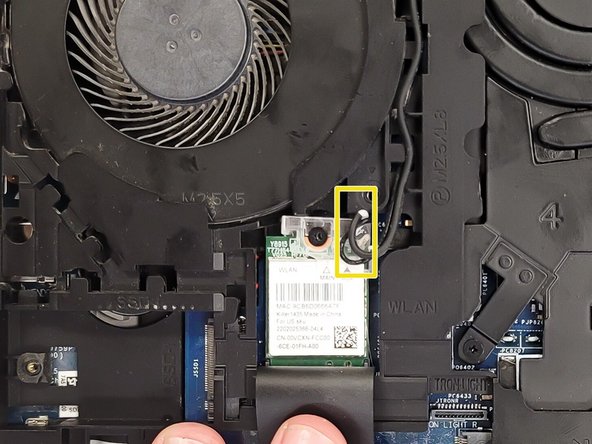
Use the Phillips #00 screwdriver to remove the screw securing the Wi-Fi card.
-
Use a spudger to detach the coaxial cables from the Wi-Fi card.
-
-




To reassemble your device, follow these instructions in reverse order.

Team

University of North Texas, Team 4-1, Saru Jimmy Fall 2022 Member of University of North Texas, Team 4-1, Saru Jimmy Fall 2022
UNT-SARU JIMMY-F22S4G1
3 Members
84 Guides authored
