
Dell AC511 Speaker Replacement

William Cook and one other contributor
Last updated on Jun 25, 2024
Views: 1.1K
View statistics:
- Past 24 Hours:
- 1
- Past 7 Days:
- 14
- Past 30 Days:
- 88
- All Time:
- 1,110
Comments: 1
1 guide comment.
Go to guide commentsCompleted: 1 2
1 person has marked this guide "completed." Will you be next?
2 people have marked this guide "completed." Including you — great job!
Favorites: 0 1
No one has favorited (and subscribed to) this guide. Will you be the first?
1 person has favorited (and subscribed to) this guide — and that's you!
Better Introduction
Improve this guide by completing or revising its introduction.
Introduction
Go to step 1 ↓If you suspect one or more of the speakers in your Dell AC511 soundbar has stopped working, you may need to replace them.
What you need
Tools


-
-
-
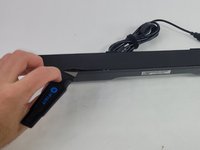
Use a Jimmy to peel off the screen stuck to the front of the speaker.
-
Start from any corner and use the Jimmy to get under the screen. Once one side lifts up, you can use your fingers to peel the rest off.
 Ask FixBot
-
-
-
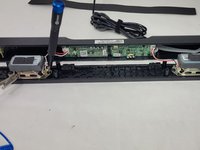
Lift the front panel off of the rest of the device.
-
Remove the 4 mm screws from the speakers using a JIS #1 screwdriver.
-
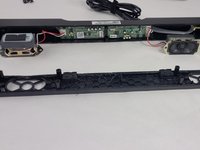
Remove the front panel from the device.
-
-
-
-
-
-
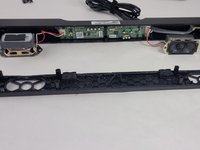
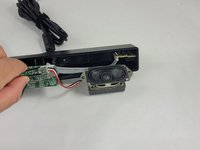
Follow the three wires connected to the speaker to find where they connect to the circuit board.
-
Use tweezers to gently rock the end of the wires back and forth until they disconnect from the board.
-
-






To reassemble your device, follow these instructions in reverse order.
Cancel: I did not complete this guide.
One other person completed this guide.

Team

UMass Dartmouth, Team 4-6, Shaddix Spring 2024 Member of UMass Dartmouth, Team 4-6, Shaddix Spring 2024
UMASSD-SHADDIX-S24S4G6
4 Members
72 Guides authored
