Free Shipping on Domestic Orders $75+

Dell Inspiron 15-7569 RAM Replacement

What you need

    1. Dell   Inspiron  15-7569 RAM Replacement, Back Cover: step 1, image 1 of 3 Dell   Inspiron  15-7569 RAM Replacement, Back Cover: step 1, image 2 of 3 Dell   Inspiron  15-7569 RAM Replacement, Back Cover: step 1, image 3 of 3
      • Remove the (10) P58F black screws on the back cover using the Phillips #0 screwdriver.

      • After removing the screws, remove the back cover using a plastic or metal spudger.

      Ask FixBot

      Add Comment

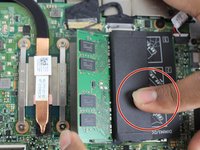
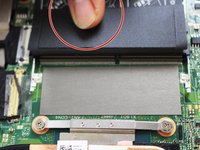
    1. Dell   Inspiron  15-7569 RAM Replacement, RAM: step 2, image 1 of 3 Dell   Inspiron  15-7569 RAM Replacement, RAM: step 2, image 2 of 3 Dell   Inspiron  15-7569 RAM Replacement, RAM: step 2, image 3 of 3
      • Locate the two black RAM "flaps" (pictured)

      • Lift each flap and push out on the metal clamps holding the RAM

      • The RAM will "pop" and "rise" when properly removed

      Ask FixBot

      Add Comment

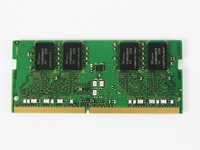
    2. Dell   Inspiron  15-7569 RAM Replacement: step 3, image 1 of 3 Dell   Inspiron  15-7569 RAM Replacement: step 3, image 2 of 3 Dell   Inspiron  15-7569 RAM Replacement: step 3, image 3 of 3
      • Gently remove the RAM by the edges.

      Ask FixBot

      Add Comment

Conclusion

To reassemble your device, follow these instructions in reverse order.

Cancel: I did not complete this guide.

Kevin Sanchez

Member since: 10/03/17

145 Reputation

1 Guide authored

Team

USF Tampa, Team S5-G4, Walkup Fall 2017 Member of USF Tampa, Team S5-G4, Walkup Fall 2017

USFT-WALKUP-F17S5G4

4 Members

72 Guides authored

0 Guide Comments

Add Comment

View Statistics:

Past 24 Hours: 0

Past 7 Days: 10

Past 30 Days: 34

All Time: 829