Free Shipping on Domestic Orders $75+

Definitive Technology W7 Speaker Replacement

What you need

  1. Definitive Technology W7 Speaker Replacement, Speaker: step 1, image 1 of 1
    • Use the metal spudger to pry off the panel at the top of the device.

    • The top panel has the device logo in the center.

    • Use the flat end of the metal spudger and place it between the gaps of the top panel and slowly pry the panel off.

    Ask FixBot

    Add Comment

  2. Definitive Technology W7 Speaker Replacement: step 2, image 1 of 1
    • Remove the thirteen Phillips #0 screws.

    Ask FixBot

    Add Comment

  3. Definitive Technology W7 Speaker Replacement: step 3, image 1 of 1
    • Remove the black panel.

    Ask FixBot

    Add Comment

  4. Definitive Technology W7 Speaker Replacement: step 4, image 1 of 2 Definitive Technology W7 Speaker Replacement: step 4, image 2 of 2
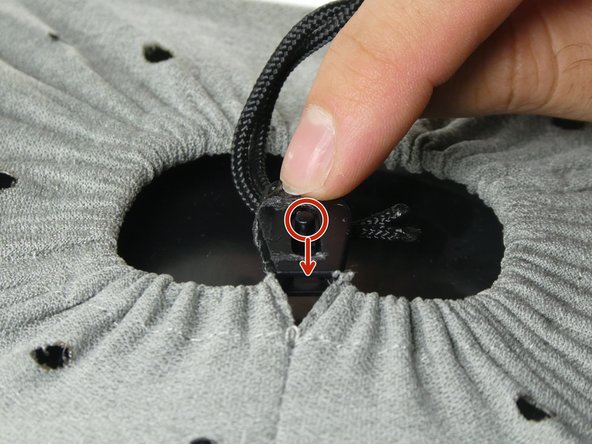
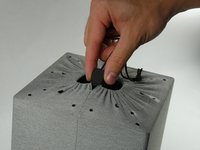
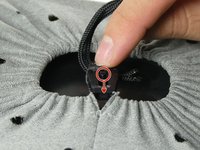
    • After you remove the black panel, you will see that the device is covered with a gray mesh, secured with a drawstring.

    • Flick the switch on the middle of the lock down to loosen the sack.

    Ask FixBot

    Add Comment

  5. Definitive Technology W7 Speaker Replacement: step 5, image 1 of 1
    • After you have flicked the switch loosen the sack and pull the sack down which will reveal the speaker.

    Ask FixBot

    Add Comment

  6. Definitive Technology W7 Speaker Replacement: step 6, image 1 of 1
    • Remove the four screws on top of the device on each corner with a Phillips #0 screwdriver.

    Ask FixBot

    Add Comment

  7. Definitive Technology W7 Speaker Replacement: step 7, image 1 of 1
    • Gently lift the top cover off the device.

    Ask FixBot

    Add Comment

  8. Definitive Technology W7 Speaker Replacement: step 8, image 1 of 1
    • If you now look inside the device, you will see the speaker which is the large cylinder on the inner side of the device.

    Ask FixBot

    Add Comment

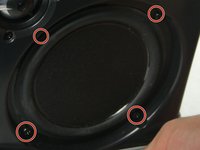
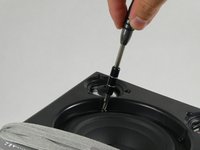
  9. Definitive Technology W7 Speaker Replacement: step 9, image 1 of 2 Definitive Technology W7 Speaker Replacement: step 9, image 2 of 2
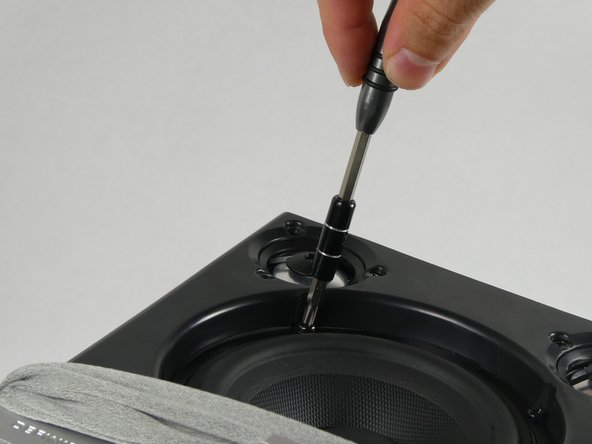
    • Remove the four Phillips #0 screws around the speaker holding it in place.

    • Now lay the device on its side with the speaker facing upward, then unscrew the screws around the speaker.

    Ask FixBot

    Add Comment

  10. Definitive Technology W7 Speaker Replacement: step 10, image 1 of 1
    • Stand the device upright and carefully pull the speaker out of the device with the wires still intact.

    Ask FixBot

    Add Comment

  11. Definitive Technology W7 Speaker Replacement: step 11, image 1 of 1
    • Now grab the end of the wire connecting the device to the speaker itself.

    • Slowly and carefully pull the wires away from the speaker.

    Ask FixBot

    Add Comment

Conclusion

To reassemble your device, follow these instructions in reverse order.

Cancel: I did not complete this guide.

One other person completed this guide.

Jamari Brewster

Member since: 10/26/22

193 Reputation

1 Guide authored

Team

UMass Dartmouth, Team 2-5, Petersen Fall 2022 Member of UMass Dartmouth, Team 2-5, Petersen Fall 2022

UMASSD-PETERSEN-F22S2G5

4 Members

6 Guides authored

0 Guide Comments

Add Comment

View Statistics:

Past 24 Hours: 3

Past 7 Days: 12

Past 30 Days: 34

All Time: 707