
DeWalt DC970 Motor Replacement

Jonathan Hamel and 2 other contributors
Last updated on May 19, 2016
Views: 8.3K
View statistics:
- Past 24 Hours:
- 3
- Past 7 Days:
- 21
- Past 30 Days:
- 175
- All Time:
- 8,336
Comments: 3
3 guide comments.
Go to guide commentsCompleted: 3 4
3 people have marked this guide "completed." Will you be next?
4 people have marked this guide "completed." Including you — great job!
Favorites: 5 6
5 people have favorited (and subscribed to) this guide. Will you be next?
6 people have favorited (and subscribed to) this guide — including you!
Featured Student Guide
This guide has been the hard work of our awesome students and is found to be exceptionally cool by the iFixit staff.
Introduction
Go to step 1 ↓If the motor of your drill is not operating properly or not operating at all, this guide will show you how to replace the motor of your drill.
What you need
Tools


-
-
-
Compress the buttons on either side of the battery and lift the drill away from battery.
 Ask FixBot
-
-
-
-
-
-
Lift drill mechanism out of the shell.
-
Desolder the red and black wires from the motor.
-
Learn more about soldering here.
-
-
-


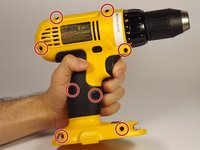
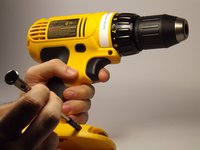


To reassemble your device, follow these instructions in reverse order.
Cancel: I did not complete this guide.
3 other people completed this guide.

Team

UMass Dartmouth, Team 4-2, Catania Spring 2016 Member of UMass Dartmouth, Team 4-2, Catania Spring 2016
UMASSD-CATANIA-S16S4G2
3 Members
84 Guides authored
3 Guide Comments
Unplug the wires from the trigger switch....don't unsolder.
New motor comes with wires.
Thanks for the heads up on the wires
