Introduction
The DXO ONE is secured with a plastic casing, so marks will inevitably be left after disassembly. Please consider this before proceeding.
-
-
-
Before you begin, please ensure that the camera lens cap has been slid up to the top of the lens and that the camera is turned off.
 Ask FixBot
-
-
-
Open the protective cover at the back of the camera to prepare for the next step.
-
Remove the memory card (if any) from the camera, then use a Phillips screwdriver to remove the 2.5mm screw located in the center.
-
-
-
-
Insert the tip of the pry bar into the gap in the casing and slide it around to loosen the latch.
-
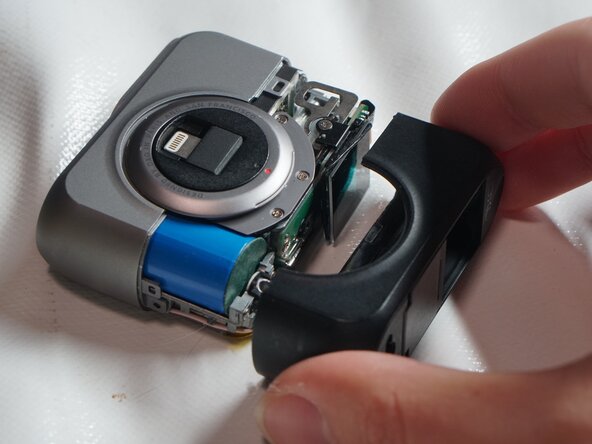
Gently shake the black plastic casing while pulling it backward.
-
Remove the black plastic casing
-
-
-
Use a Phillips screwdriver to remove the 3mm screws from the side bracket of the OLED screen.
-
Raise the OLED screen.
-
Use a plastic pry bar to open the clips securing the ribbon cable.
-
-
-
Use tweezers to pull the ribbon cable out of the clip.
-
Remove the two 3mm screws located on the circuit board.
-
Insert the plastic pry bar into the gap shown in the picture to separate the circuit board from the clip below.
-
-
-
Use a plastic pry bar to pry open the clips on the black ribbon cable.
-
Use tweezers to remove the black ribbon cable.
-
Remove the OLED screen
-
-




When reassembling your equipment, please follow the reverse order of the instructions.
Cancel: I did not complete this guide.
One other person completed this guide.
Special thanks to these translators:
100%

Jun Huang Lin (小強) is helping us fix the world! Want to contribute?
Start translating ›

