
DROCON Ninja Propeller Replacement

Taylor Ullmann and 2 other contributors
Last updated on May 27, 2020
Views: 2.5K
View statistics:
- Past 24 Hours:
- 0
- Past 7 Days:
- 11
- Past 30 Days:
- 75
- All Time:
- 2,451
Comments: 6
2 comments on steps, 4 guide comments.
Go to guide commentsCompleted: 2 3
2 people have marked this guide "completed." Will you be next?
3 people have marked this guide "completed." Including you — great job!
Favorites: 0 1
No one has favorited (and subscribed to) this guide. Will you be the first?
1 person has favorited (and subscribed to) this guide — and that's you!
Introduction
Go to step 1 ↓This guide is a replacement guide for the propellers on the DROCON Ninja DC-014 drone. The propellers are the part of the device that spins, which allows the drone to fly. If the blades are chipped or bent they may need to be replaced. To determine if the propeller needs replacement check out the troubleshooting guide linked here. You will not need any tools for this guide and there are no difficult steps required.
-
-
-
To turn the drone off, press and hold the black button on the top of the drone until all lights are off.
-
Firmly grasp the battery tab between your thumb and index finger.
-
Pull the battery away from the drone's body
 Ask FixBot
-
-
-
-
-
Firmly grasp the blade guard from the bottom of the drone
-
Pull the blade guard straight down away from motor.
-
-
-
-
Grasp the center of the propeller that needs to be replaced.
-
Pull the propeller directly up and away from the motor.
-
-


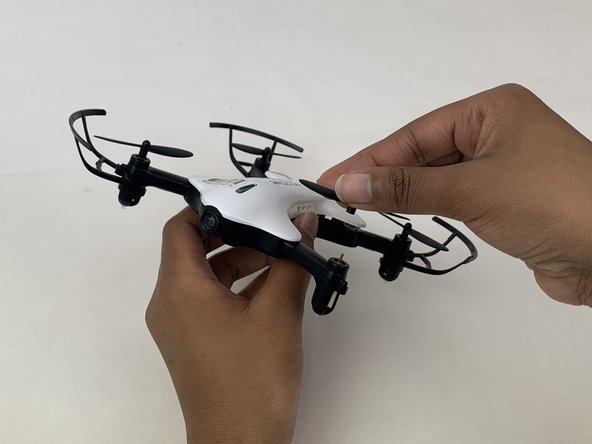
To reassemble your device, follow these instructions in reverse order.
Cancel: I did not complete this guide.
2 other people completed this guide.

Team

Embry-Riddle Aeronautical University, Team S3-G5, Watkins Spring 2020 Member of Embry-Riddle Aeronautical University, Team S3-G5, Watkins Spring 2020
ERAU-WATKINS-S20S3G5
4 Members
60 Guides authored
4 Guide Comments
can we buy an extra battery?
can we buy an extra battery for the roconDC-014
hi i have the red & bleu drocon dc-014 & wold like to order the white drocon dc-014 white drone or white body cover
tank you! & happy new year!!!
i both drocon dc-014 blue & red wold like by the white drocon dc-014 or uper casse
