Introduction
If your DJI Spark (model CP.PT.000903) is moving erratically and you believe that the internal GPS is broken, use this guide to gain access to the GPS and replace it. The internal GPS informs the drone of its location and allows it to move by interpreting input from the controller as directions. If the internal GPS of your DJI Spark is faulty or broken, the drone may jump around or fail to respond to input from either the manual controller or virtual controller.
What you need
-
-
-
-
Flip the drone over.
-
Grip the left and right sides of the battery.
-
Slide firmly forward until it pops out.
-
-
-
-
-
-
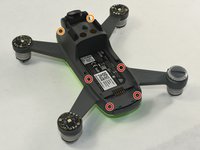
Flip the drone over.
-
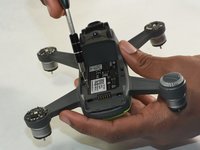
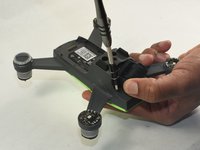
Remove the four 1.5mm Hex screws.
-
Remove the two 1.5mm Hex screws near the camera head.
-
-
-
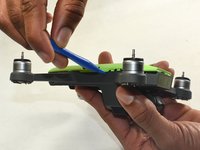
Hold the drone so the lid is facing up.
-
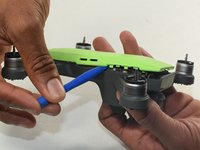
Insert the plastic opening tool into the side of the drone.
-
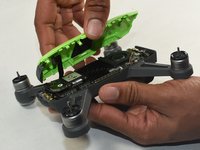
Slide the tool around the perimeter until you can lift the top off.
-
-
-
-
-
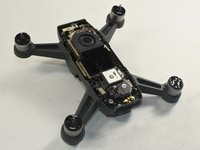
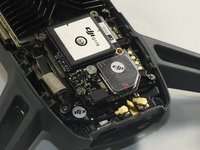
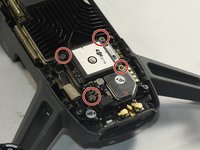
Identify the GPS module on the motherboard.
-
The GPS module will be labeled as ‘DJI G116’.
-
-
-
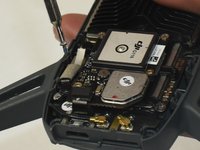
Remove the four 6.0 mm Phillips #000 screws holding the GPS module to the motherboard.
-
-
-
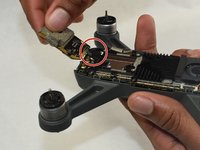
Pick up the GPS module.
-
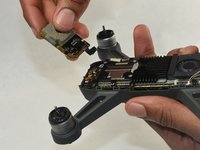
Carefully disconnect the GPS module ribbon cable from the motherboard.
-
Remove the GPS module.
-
-

 Ask FixBot










To reassemble your device, follow these instructions in reverse order.
Cancel: I did not complete this guide.
3 other people completed this guide.

Team

UMass Dartmouth, Team S1-G7, Botvin Fall 2019 Member of UMass Dartmouth, Team S1-G7, Botvin Fall 2019
UMASSD-BOTVIN-F19S1G7
3 Members
83 Guides authored
5 Guide Comments
How About Spark's Wifi can't find?
GPS module ribbon cable is broken where can i buy?
please if some one have it send it to me
i will pay u
hey, i have a site where you can buy it from.
here, sorry i am 2 years late lol.. https://www.aliexpress.us/item/325680159...
