Introduction
This guide will be used to open the DJI Phantom 3 Standard Remote Controller to access and replace the USB charge port. A working charge port is necessary to use your controller. Without it, the remote controller loses its battery life and stops working. The USB port also allows users to connect their mobile devices to the drone and its controller. If you suspect the USB port is clogged, try using a toothpick to remove any debris.
What you need
-
-
Position the controller so the back is facing up and the joysticks are resting on the table.
-
Remove the four 11 mm screws that secure the back plate using a JIS #0 screwdriver.
-
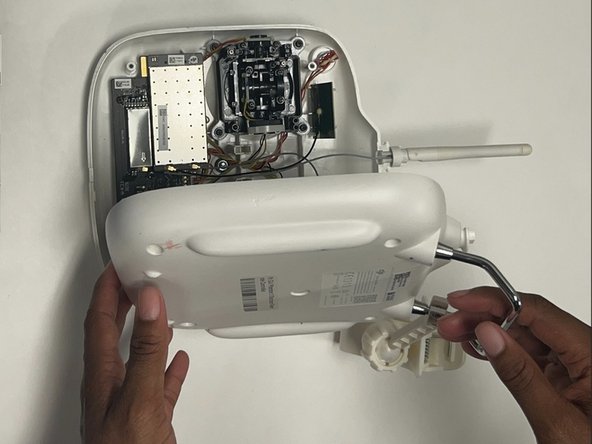
Remove the back plate, being mindful of the wires still connected to the device.
 Ask FixBot
-
-



To reassemble your device, follow these instructions in reverse order.

Team

Western Carolina University, Team 1-5, Virtue Fall 2024 Member of Western Carolina University, Team 1-5, Virtue Fall 2024
WCU-VIRTUE-F24S1G5
4 Members
5 Guides authored
