
DJI Phantom 3 Standard Remote Controller Battery Replacement

Alex Quigg and 3 other contributors
Last updated on Jan 23, 2025
Views: 1.3K
View statistics:
- Past 24 Hours:
- 1
- Past 7 Days:
- 26
- Past 30 Days:
- 96
- All Time:
- 1,295
Comments: 0
No one has left comments on this guide. Will you be first?
Go to guide commentsCompleted: 0 1
No one has marked this guide "completed." Will you be the first?
1 person has marked this guide "completed." It's you — great job!
Favorites: 0 1
No one has favorited (and subscribed to) this guide. Will you be the first?
1 person has favorited (and subscribed to) this guide — and that's you!
Introduction
Go to step 1 ↓This guide will be used to open the DJI Phantom 3 Standard Remote Controller to access and change the battery. If your controller isn't charging properly, check out this troubleshooting page before continuing onto the repair guide. Step 3 should be handled carefully to avoid damage to the connection between the battery and the connection port.
What you need
Parts
Tools


-
-
-
Position the controller so the back is facing up and the joysticks are resting on the table.
-
Remove the four 11 mm screws that secure the back plate using a Phillips #0 screwdriver.
-
Remove the back plate, being mindful of the wires still connected to the device.
 Ask FixBot
-
-
-
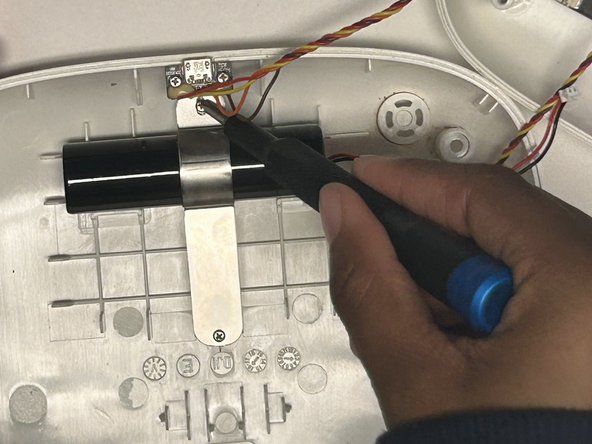
Remove the two 8 mm screws securing the battery to the controller using a JIS #00 screwdriver.
-
-
-
-
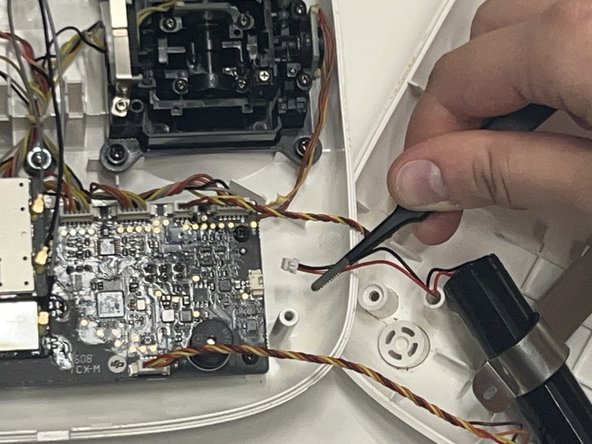
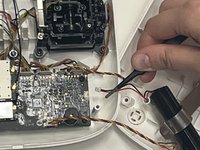
Use the nylon-tipped tweezers to detach the three-prong battery attachment that connects the battery to the motherboard.
-
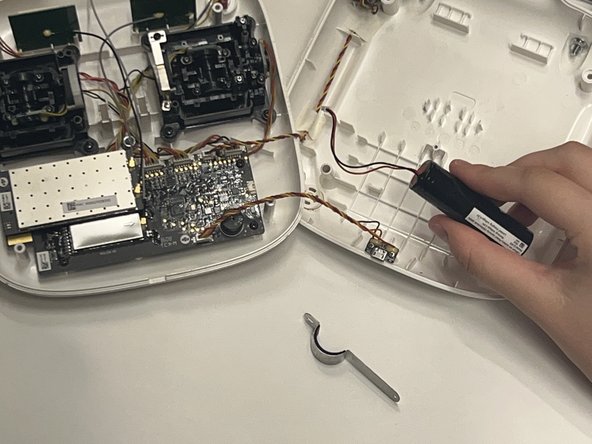
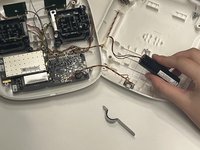
Remove the battery.
-
-




To reassemble your device, follow these instructions in reverse order.

Team

Western Carolina University, Team 1-5, Virtue Fall 2024 Member of Western Carolina University, Team 1-5, Virtue Fall 2024
WCU-VIRTUE-F24S1G5
4 Members
60 Guides authored
