Free Shipping on Domestic Orders $75+

DJI Phantom 3 Advanced Cover Replacement

What you need

  1. DJI Phantom 3 Advanced Cover Replacement, Battery: step 1, image 1 of 2 DJI Phantom 3 Advanced Cover Replacement, Battery: step 1, image 2 of 2
    • With the battery facing you, locate the two tabs on the top and bottom of the battery as shown.

    • Remember to disarm and power down your quadcopter before beginning any disassembly.

    Ask FixBot

    Add Comment

  2. DJI Phantom 3 Advanced Cover Replacement: step 2, image 1 of 2 DJI Phantom 3 Advanced Cover Replacement: step 2, image 2 of 2
    • Press the two tabs with your finger and thumb, and gently slide the battery towards you, out of the quadcopter frame.

    • With your other hand, be sure to hold the quadcopter steady to ensure that it stays still.

    Ask FixBot

    Add Comment

  3. DJI Phantom 3 Advanced Cover Replacement, Cover: step 3, image 1 of 1
    • Turn the Phantom 3 Advanced upside down.

    Ask FixBot

    Add Comment

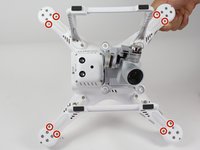
  4. DJI Phantom 3 Advanced Cover Replacement: step 4, image 1 of 1
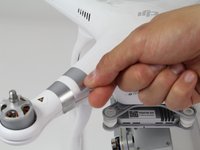
    • Remove the four 7mm long 2mm screws with a T-6 screwdriver.

    • There is one screw per arm, located at the tip of the arm.

    Ask FixBot

    Add Comment

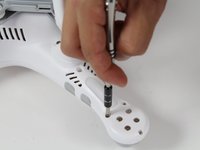
  5. DJI Phantom 3 Advanced Cover Replacement: step 5, image 1 of 2 DJI Phantom 3 Advanced Cover Replacement: step 5, image 2 of 2
    • Remove the eight 5mm long 2.5mm screws using the T-8 screwdriver.

    • There are two 5mm screws on each arm.

    Ask FixBot

    Add Comment

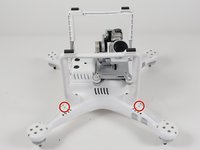
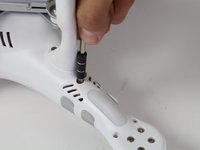
  6. DJI Phantom 3 Advanced Cover Replacement: step 6, image 1 of 2 DJI Phantom 3 Advanced Cover Replacement: step 6, image 2 of 2
    • Remove the four 10mm long deep 3mm screws using the T-8 screwdriver.

    • There is one screw on each arm located near the landing gear.

    Ask FixBot

    Add Comment

  7. DJI Phantom 3 Advanced Cover Replacement: step 7, image 1 of 3 DJI Phantom 3 Advanced Cover Replacement: step 7, image 2 of 3 DJI Phantom 3 Advanced Cover Replacement: step 7, image 3 of 3
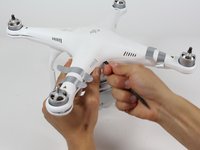
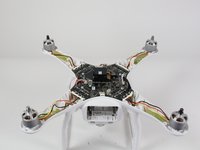
    • Carefully flip the phantom back over with the motors facing up.

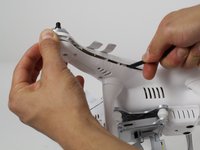
    • Peel back the silver stickers from the seam in the cover.

    • Using a plastic spudger, slowly separate the two halves of the plastic shell.

    • This step requires some force, and the plastic will click loudly as the shell separates.

    • Do not fully remove the cover. There is a wire that needs to be detached from the control board before the cover is completely free.

    Ask FixBot

    Add Comment

  8. DJI Phantom 3 Advanced Cover Replacement: step 8, image 1 of 3 DJI Phantom 3 Advanced Cover Replacement: step 8, image 2 of 3 DJI Phantom 3 Advanced Cover Replacement: step 8, image 3 of 3
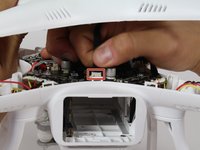
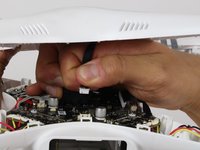
    • Slowly remove the upper half of the plastic case about halfway. There is a ribbon cable that's connects the cover and the control board.

    • Follow the ribbon cable to the control board and locate the connector that connects the cable to the control board.

    • Press the tab on the side of the connector and pull up on the cable.

    • Continue to remove the shell the rest of the way.

    Ask FixBot

    Add Comment

Conclusion

To reassemble your device, follow these instructions in reverse order.

Cancel: I did not complete this guide.

11 other people completed this guide.

Robert Comstock

Member since: 10/06/16

436 Reputation

2 Guides authored

Team

Cal Poly, Team 10-2, Livingston Fall 2016 Member of Cal Poly, Team 10-2, Livingston Fall 2016

CPSU-LIVINGSTON-F16S10G2

3 Members

12 Guides authored

3 Guide Comments

Great Job Robert! Even the “Phantom Pilots Forum” had no recent recommendations for a disassembly manual, as DJI likes to “Fixit” themselves!

Michael Steinbrecher - Reply Share

Excellent detailed instructions. Having pictures on procedure makes it idiot proof.

Bolo - Reply Share

Does this also include the phantom 3 professional too? My understanding is that the only differences between them is the battery charger and the pro is 4k recording vs 1080p.

John D - Reply Share

Add Comment

View Statistics:

Past 24 Hours: 3

Past 7 Days: 17

Past 30 Days: 80

All Time: 5,894