Introduction
This guide is for removing the DJI Mavic Pro Front Vision. To get to the front vision, you will need to remove the battery, upper shell, and gimbal first. In order to remove the gimbal in step 8, you will need to scrape some plastic adhesive off your device. Tweezers and three different sized screwdrivers are required for this guide.
What you need
-
-
-
Grab both sides of the battery.
-
Pinch the releasing buttons on both sides of the battery.
-
Lift the battery up and out.
 Ask FixBot
-
-
-
-
-
Remove the six 5mm 1.5 Hex screws by turning the screwdriver counterclockwise.
-
-
-
Flip the drone over so that the gimbal is facing up.
-
Remove the two 4mm 1.5 Hex screws near the gimbal case by turning the screwdriver counterclockwise.
-
Remove the two 5mm 1.5 Hex screws near the gimbal case by turning the screwdriver counterclockwise.
-
-
Tool used on this step:Tweezers$4.99
-
Remove the two small panel pieces near the gimbal case with the tweezers.
-
-
-
Remove the two 5mm 1.5 Hex screws and two PH000 screws that are under the panel pieces by turning the respective screwdrivers counterclockwise.
-
-
-
Flip the drone back over so the upper shell is facing up.
-
Pry off the upper shell with a nylon spudger.
-
-
-
Remove the white connector at the back of the flight controller board by gently pulling at the base.
-
-
-
-
-
-
Remove the one 5mm JIS #0 screw from the small micro controller board at the front of the DJI Mavic Pro by turning counterclockwise.
-
-
Tool used on this step:Tweezers$4.99
-
Pull the cord and micro controller board away from the front of the DJI Mavic Pro using tweezers.
-
-
-
Expose the two small ZIF connectors near the front of the board by removing the plastic coverings.
-
Then, remove the two ZIF connectors under the coverings using a nylon spudger.
-
-
-
Remove two 6mm JIS #00 screws from the plastic board cover at the front of the DJI Mavic Pro.
-
-
-
Flip the DJI Mavic Pro over.
-
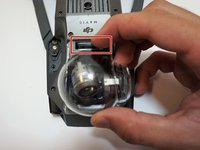
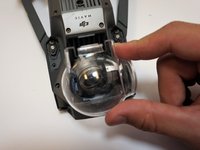
Gently press the latch for the Gimbal cover.
-
Pull the cover off.
-
-
-
Flip the DJI Mavic Pro back over, with its top side facing up.
-
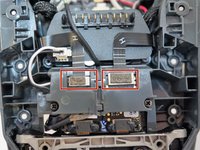
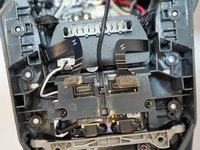
Remove the two ZIF connectors located behind the plastic covers by using a nylon spudger.
-
-
-
Gently remove the power cable connector located to the left, behind the gimbal board, by pulling up on the white base.
-
-
-
Scrape away the plastic adhesive covering the two 5mm JIS #000 screws connected to the gimbal board.
-
Remove the two 5mm JIS #000 screws from the gimbal board by turning the screwdriver counterclockwise.
-
-
-
Remove the two 7mm JIS #00 screws at the very front of the DJI Mavic Pro by turning the screwdriver counterclockwise.
-
Careful when removing these screws the camera or whatever remains of your camera assembly may drop
-
-
-
Flip the DJI Mavic Pro over, with the camera facing you.
-
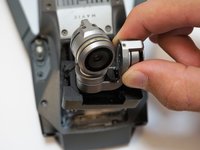
Gently pull the gimbal/camera assembly up and out.
-
-
-
-
-
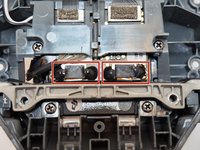
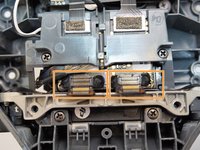
Remove the front vision piece by pulling the piece up and away from the drone body.
-










To reassemble your device, follow these instructions in reverse order.
Cancel: I did not complete this guide.
8 other people completed this guide.

Team

Cal Poly, Team S17-G3, White Fall 2018 Member of Cal Poly, Team S17-G3, White Fall 2018
CPSU-WHITE-F18S17G3
4 Members
72 Guides authored
4 Guide Comments
What error codes did you get before having to replace this front cameras?
la nacelle de mon drone mavic pro ne fais aucun mouvement quand je l'allume s'il vous plaît quel pourrait être le problème ?
Picharkayo@gmail.com
I have error of forward motion isn’t recognizing how can I fix it please help
