
CyberHome CH-DVD 300 Back Panel Replacement

Chris Menezes and 4 other contributors
Last updated on Jun 3, 2014
Views: 1.2K
View statistics:
- Past 24 Hours:
- 4
- Past 7 Days:
- 16
- Past 30 Days:
- 108
- All Time:
- 1,156
Comments: 0
No one has left comments on this guide. Will you be first?
Go to guide commentsCompleted: 1 2
1 person has marked this guide "completed." Will you be next?
2 people have marked this guide "completed." Including you — great job!
Favorites: 0 1
No one has favorited (and subscribed to) this guide. Will you be the first?
1 person has favorited (and subscribed to) this guide — and that's you!
Introduction
Go to step 1 ↓Removing the back panel requires taking of the top panel first. Then, you must remove four more screws on the back.
What you need
Tools

-
-
-
Unplug the DVD player from the wall socket.
-
Locate the 15mm Phillips screws on the left side (1 screw), right side (1 screw), and back (4 screws) of the DVD Player. Use the appropriate Phillips head screwdriver to remove the six screws.
 Ask FixBot
-
-
-
Remove the top panel of the DVD Player by:
-
Sliding the top panel backwards.
-
Gently lifting the back of the top panel up.
-
-
-
-
-
-
Remove the back panel by:
-
Lifting up on the back panel.
-
Pulling the back panel backwards from the DVD player.
-


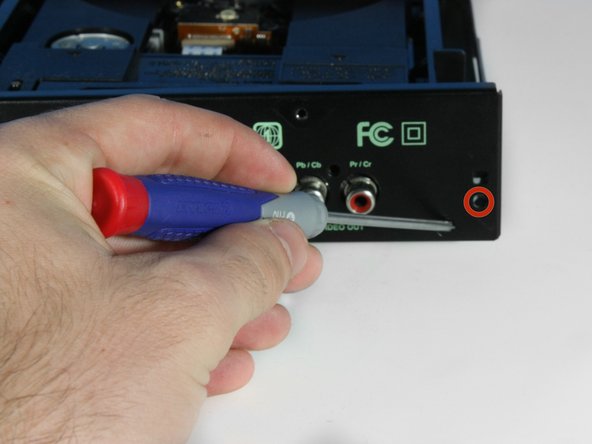

To reassemble your device, follow these instructions in reverse order.
Cancel: I did not complete this guide.
One other person completed this guide.

Team

Cal Poly, Team 6-5, Forte Spring 2014 Member of Cal Poly, Team 6-5, Forte Spring 2014
CPSU-FORTE-S14S6G5
5 Members
60 Guides authored
