Free Shipping on Domestic Orders $75+

Cuisinart DFP-14BCN Buttons Replacement

What you need

  1. Cuisinart DFP-14BCN Buttons Replacement, Bowl: step 1, image 1 of 3 Cuisinart DFP-14BCN Buttons Replacement, Bowl: step 1, image 2 of 3 Cuisinart DFP-14BCN Buttons Replacement, Bowl: step 1, image 3 of 3
    • Unplug your food processor before starting any disassembly.

    • Remove the small pusher by rotating it clockwise and lifting up.

    Ask FixBot

    Add Comment

  2. Cuisinart DFP-14BCN Buttons Replacement: step 2, image 1 of 1
    • Remove the large pusher by grabbing its sides and pulling up.

    • There may be a clicking sound from the safety feature being disengaged in this step.

    Ask FixBot

    Add Comment

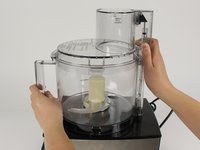
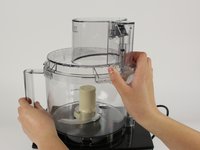
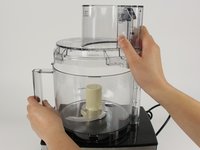
  3. Cuisinart DFP-14BCN Buttons Replacement: step 3, image 1 of 3 Cuisinart DFP-14BCN Buttons Replacement: step 3, image 2 of 3 Cuisinart DFP-14BCN Buttons Replacement: step 3, image 3 of 3
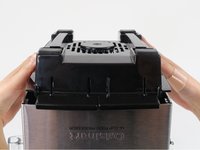
    • Remove the lid from the bowl by turning it clockwise and lifting.

    Ask FixBot
    Add Comment

  4. Cuisinart DFP-14BCN Buttons Replacement: step 4, image 1 of 1
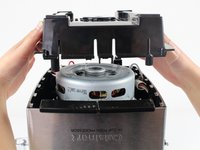
    • Take out the blades by grabbing the plastic center piece and lifting up.

    • Avoid contact with blades as they are extremely sharp.

    Ask FixBot
    Add Comment

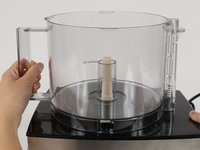
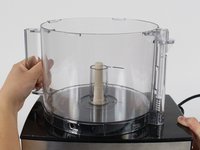
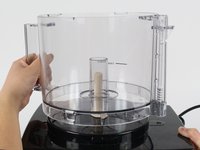
  5. Cuisinart DFP-14BCN Buttons Replacement: step 5, image 1 of 3 Cuisinart DFP-14BCN Buttons Replacement: step 5, image 2 of 3 Cuisinart DFP-14BCN Buttons Replacement: step 5, image 3 of 3
    • Position the handle of the bowl so that it is on your left.

    • Grab the handle and push clockwise. Lift up the bowl to remove it.

    Ask FixBot

    Add Comment

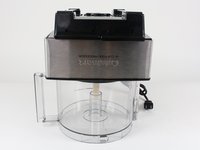
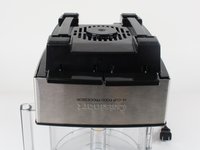
  6. Cuisinart DFP-14BCN Buttons Replacement, Back Casing: step 6, image 1 of 2 Cuisinart DFP-14BCN Buttons Replacement, Back Casing: step 6, image 2 of 2
    • Turn the food processor's base upside down by lifting it up and turning it over.

    • Position the base so that the on and pulse buttons are facing you.

    • Place the base on top of the food processor's bowl to keep the base from wobbling while you work on it.

    Ask FixBot

    Add Comment

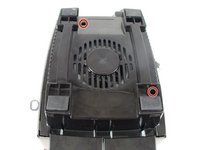
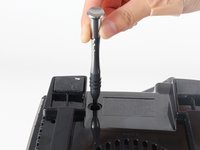
  7. Cuisinart DFP-14BCN Buttons Replacement: step 7, image 1 of 2 Cuisinart DFP-14BCN Buttons Replacement: step 7, image 2 of 2
    • Remove the two 13.0mm screws that hold down the casing with a Phillips #2 screwdriver.

    Ask FixBot

    Add Comment

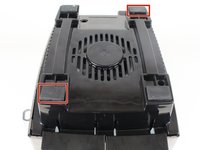
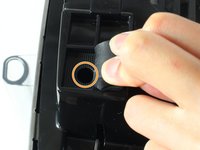
  8. Cuisinart DFP-14BCN Buttons Replacement: step 8, image 1 of 3 Cuisinart DFP-14BCN Buttons Replacement: step 8, image 2 of 3 Cuisinart DFP-14BCN Buttons Replacement: step 8, image 3 of 3
    • Lift up the front left and the back right rubber feet by pulling back the rubber with your fingers.

    • Remove the 13.0mm screw under each rubber foot with a Phillips #2 screwdriver.

    Ask FixBot
    Add Comment

  9. Cuisinart DFP-14BCN Buttons Replacement: step 9, image 1 of 2 Cuisinart DFP-14BCN Buttons Replacement: step 9, image 2 of 2
    • Lift off the back casing by raising it upward.

    Ask FixBot
    Add Comment

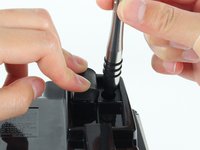
  10. Cuisinart DFP-14BCN Buttons Replacement, Buttons: step 10, image 1 of 3 Cuisinart DFP-14BCN Buttons Replacement, Buttons: step 10, image 2 of 3 Cuisinart DFP-14BCN Buttons Replacement, Buttons: step 10, image 3 of 3
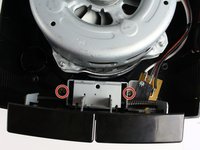
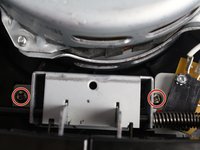
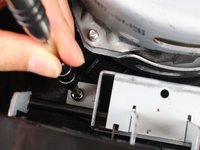
    • Remove the two 13.0mm screws that are holding down the button assembly using the Phillips #2 screwdriver.

    Ask FixBot
    Add Comment

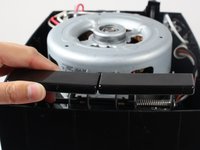
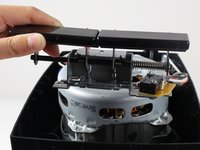
  11. Cuisinart DFP-14BCN Buttons Replacement: step 11, image 1 of 2 Cuisinart DFP-14BCN Buttons Replacement: step 11, image 2 of 2
    • Lift out the button assembly by pulling up.

    Ask FixBot

    Add Comment

  12. Cuisinart DFP-14BCN Buttons Replacement: step 12, image 1 of 1
    • Remove the two 5.5mm nuts with a 5.5mm nut driver.

    Ask FixBot

    Add Comment

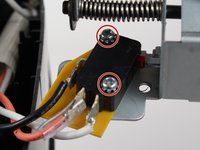
  13. Cuisinart DFP-14BCN Buttons Replacement: step 13, image 1 of 3 Cuisinart DFP-14BCN Buttons Replacement: step 13, image 2 of 3 Cuisinart DFP-14BCN Buttons Replacement: step 13, image 3 of 3
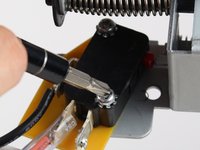
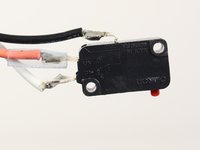
    • Remove the two 13.0mm screws that hold the switch to the button assembly with a Phillips #2 screwdriver.

    • The screws have glue in their threads, so this step might require a little extra force.

    • Slide off the switch and yellow plastic to remove the button assembly.

    Ask FixBot

    Add Comment

Conclusion

To reassemble your device, follow these instructions in reverse order.

Cancel: I did not complete this guide.

One other person completed this guide.

Sonya Dick

Member since: 10/05/16

367 Reputation

3 Guides authored

Team

Cal Poly, Team 10-3, Livingston Fall 2016 Member of Cal Poly, Team 10-3, Livingston Fall 2016

CPSU-LIVINGSTON-F16S10G3

3 Members

7 Guides authored

1 Guide Comment

Is there a source for replacing the button assembly?

BadMahoney - Reply Share

Add Comment

View Statistics:

Past 24 Hours: 1

Past 7 Days: 15

Past 30 Days: 37

All Time: 1,752