Introduction
This guide will inform the user on how to replace a damaged power cord. It can also be used to show how to check for proper connection.
-
-
Remove the power cord from the wall outlet first, disconnecting power from the device.
 Ask FixBot
-
-
-
-
Orient the device with with the LED facing away from the user allowing access to the input jack of the power cord.
-
-
-
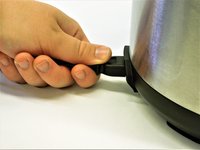
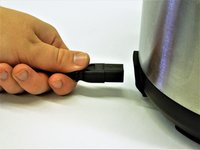
Grasp the power cord input connector firmly with forefinger and thumb.
-
Without tugging, apply pulling force until the connector is free from device
-


To reassemble your device, follow these instructions in reverse order.
Cancel: I did not complete this guide.
2 other people completed this guide.

Team

The Citadel Military College of South Carolina, Team S3-G9, Eggleston Fall 2018 Member of The Citadel Military College of South Carolina, Team S3-G9, Eggleston Fall 2018
CMCSC-EGGLESTON-F18S3G9
4 Members
14 Guides authored
7 Guide Comments
Still does not work.
My Slow cooker will not reset its self So I can brown sorta . It still says put on the lid
Crook pot lid won't unlock after unit is cool
