Free Shipping on Domestic Orders $75+

Creative Ziio 7" Right Speaker Replacement

What you need

    1. Creative Ziio 7" Right Speaker Replacement, Back Panel: step 1, image 1 of 3 Creative Ziio 7" Right Speaker Replacement, Back Panel: step 1, image 2 of 3 Creative Ziio 7" Right Speaker Replacement, Back Panel: step 1, image 3 of 3
      • Remove the back panel by using the plastic opening tool to carefully pry around the panel's edges.

      • The volume control button and the top power button may fall out during this step.

      Ask FixBot

      Add Comment

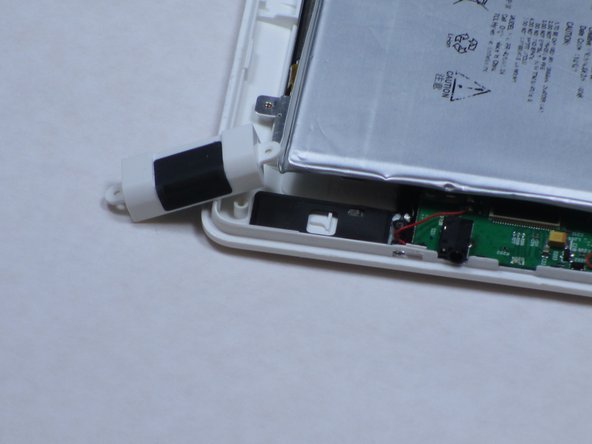
    1. Creative Ziio 7" Right Speaker Replacement, Right Speaker: step 2, image 1 of 1
      • The right speaker is directly below the battery as shown.

      • Remove the two 4mm Phillips #00 screws found in the speaker at the bottom left corner of the device.

      Ask FixBot

      Add Comment

    2. Creative Ziio 7" Right Speaker Replacement: step 3, image 1 of 2 Creative Ziio 7" Right Speaker Replacement: step 3, image 2 of 2
      • Once the screws are removed, discard the broken speaker.

      • Replace the broken speaker with a new right speaker.

      Ask FixBot

      Add Comment

Conclusion

To reassemble your device, follow these instructions in reverse order.

Cancel: I did not complete this guide.

One other person completed this guide.

Bryce Simmons

Member since: 04/16/13

150 Reputation

2 Guides authored

Team

Cal Poly, Team 14-10, Maness Spring 2013 Member of Cal Poly, Team 14-10, Maness Spring 2013

CPSU-MANESS-S13S14G10

4 Members

84 Guides authored

0 Guide Comments

Add Comment

View Statistics:

Past 24 Hours: 2

Past 7 Days: 25

Past 30 Days: 99

All Time: 594