
Creative Nomad Jukebox Zen Display Screen Replacement

Austin Shaw and 4 other contributors
Last updated on May 17, 2017
Views: 1K
View statistics:
- Past 24 Hours:
- 1
- Past 7 Days:
- 19
- Past 30 Days:
- 83
- All Time:
- 1,029
Comments: 0
No one has left comments on this guide. Will you be first?
Go to guide commentsCompleted: 0 1
No one has marked this guide "completed." Will you be the first?
1 person has marked this guide "completed." It's you — great job!
Favorites: 0 1
No one has favorited (and subscribed to) this guide. Will you be the first?
1 person has favorited (and subscribed to) this guide — and that's you!
Introduction
Go to step 1 ↓Hello! This guide will show you the steps to replace the damaged/cracked screen in your Creative Nomad Jukebox Zen Device and have you listening to your music again in no time! Please use caution when using the soldering tool.
What you need
Tools
-
Spudger4.9
-
-


-
-
-
Use the plastic opening tool to open the top cover by carefully prying at each corner.
-
-
-
-
Once the front face is removed, remove the three 6.8mm J0 screws from the metal cover and remove it.
-
-
-
-
-
Using the plastic opening tool to pop the metal tab holding the battery in place.
-
-
-
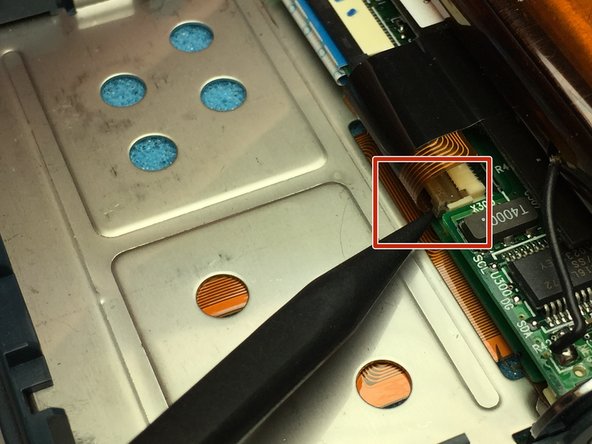
Use the spudger tool to unclip the screens wiring pigtail clipped into the motherboard.
-
-
-
-
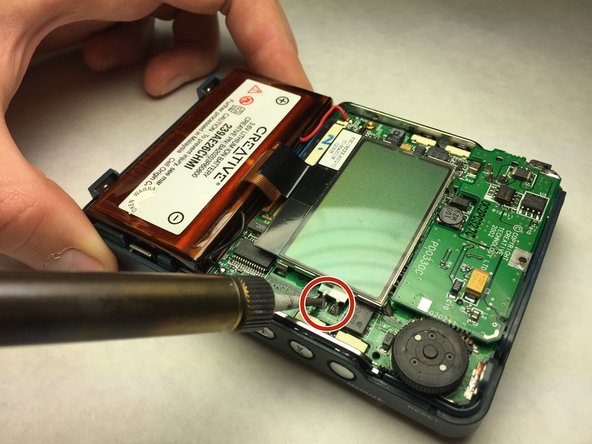
Use soldering iron to melt the solder used to hold the display screen to the motherboard.
-
-
-
Using the spudger tool, gently pry up the corners of the display screen to remove it.
-
-


 Ask FixBot






To reassemble your device, follow these instructions in reverse order.

Team

IUPUI, Team S4-G5, Baechle Spring 2017 Member of IUPUI, Team S4-G5, Baechle Spring 2017
IUPUI-BAECHLE-S17S4G5
4 Members
60 Guides authored
