
Creality Ender 3 Pro Extruder Replacement

Bryan Rivera and 3 other contributors
Last updated on Aug 14, 2023
Views: 7.1K
View statistics:
- Past 24 Hours:
- 6
- Past 7 Days:
- 43
- Past 30 Days:
- 190
- All Time:
- 7,074
Comments: 1
1 comment on steps.
Completed: 1 2
1 person has marked this guide "completed." Will you be next?
2 people have marked this guide "completed." Including you — great job!
Favorites: 0 1
No one has favorited (and subscribed to) this guide. Will you be the first?
1 person has favorited (and subscribed to) this guide — and that's you!
Community-Contributed Guide
An awesome member of our community made this guide. It was not created by iFixit staff.
Featured Student Guide
This guide has been the hard work of our awesome students and is found to be exceptionally cool by the iFixit staff.
Introduction
Go to step 1 ↓This guide's intention is to solve problems like your filament grinding in your Creality Ender 3 Pro. This is often caused by the extruder arm applying too much pressure (or too little) to the filament. To complete this guide, you should have a replacement extruder ready for your extruder mechanism, which you can purchase online.
All the tools you need are a 2.5 mm hex key, a 8 mm wrench, and around 10-15 minutes of your time!
What you need
Parts
Tools


-
-
-
Press the knob to enter the marlin LCD menu and turn it to navigate between the options.
-
Navigate to Temperature > Nozzle.
-
Adjust the nozzle temperature by turning the knob and confirm by pressing it.
 Ask FixBot
-
-
-
Wait until the current temperature (bottom) matches the target temperature (top).
-
-
-
Press down on the extruder lever arm and pull out the loaded filament.
-
-
-
-
-
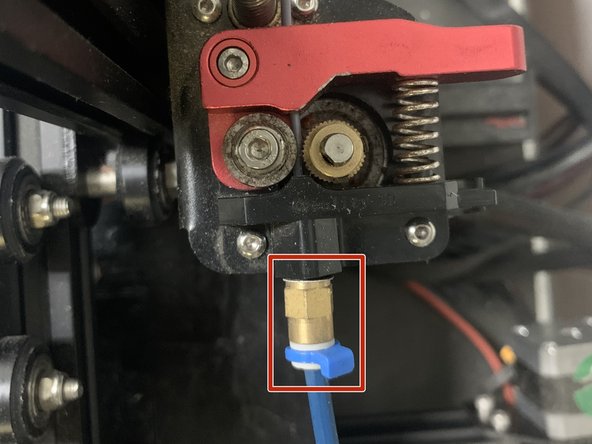
Use a 8 mm wrench or some pliers to unscrew the PTFE tube from the extruder mechanism.
-
-
-
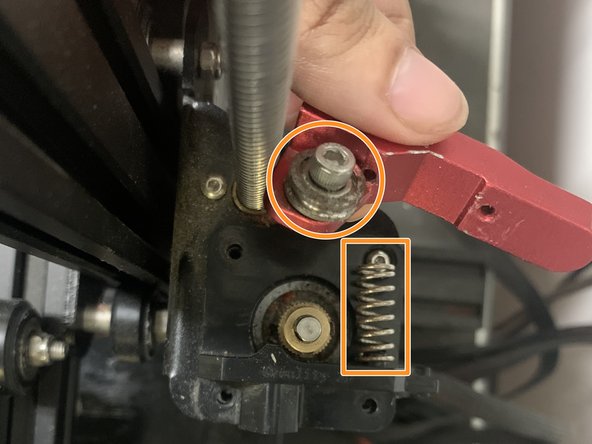
Unscrew the single M3x18 socket head screw with a 2.5 mm hex key.
-
Remove the extruder arm and spring.
-
-
-
-
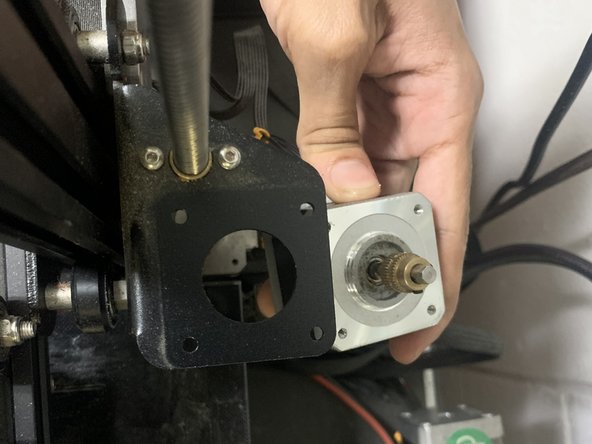
Use a 2 mm hex key to remove the three remaining M3x10 socket head screws while making sure to not let the motor drop.
-
Remove the plastic bracket and the motor.
-
-
-
Install the replacement extruder and screw it to the motor, following all the previous steps backwards.
-
-








Don't forget to recalibrate your E steps!
Cancel: I did not complete this guide.
One other person completed this guide.

Team

University of Puerto Rico Mayagüez, Team 3-25, Cools Stephens Spring 2022 Member of University of Puerto Rico Mayagüez, Team 3-25, Cools Stephens Spring 2022
UPRM-COOLS STEPHENS-S22S3G25
1 Member
12 Guides authored
