Free Shipping on Domestic Orders $75+

Corsair K65 Plus Wireless Key Switch Replacement

What you need

  1. Corsair K65 Plus Wireless Key Switch Replacement, Keycap: step 1, image 1 of 1
    • Place the keyboard face up on a flat surface.

    Ask FixBot

    Add Comment

  2. Corsair K65 Plus Wireless Key Switch Replacement: step 2, image 1 of 2 Corsair K65 Plus Wireless Key Switch Replacement: step 2, image 2 of 2
    • Use a keycap puller to grip the keycap and pull straight up from the keyboard.

    Ask FixBot

    Add Comment

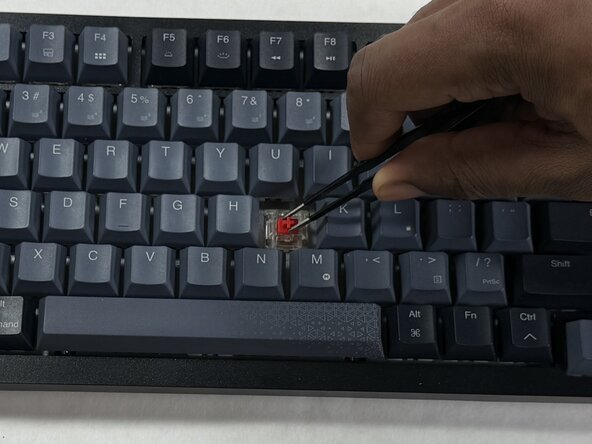
  3. Corsair K65 Plus Wireless Key Switch Replacement, Key Switch: step 3, image 1 of 2 Corsair K65 Plus Wireless Key Switch Replacement, Key Switch: step 3, image 2 of 2
    • Use a key switch puller to grip the key switch and pull straight up to remove it.

    Ask FixBot

    Add Comment

  4. Corsair K65 Plus Wireless Key Switch Replacement: step 4, image 1 of 2 Corsair K65 Plus Wireless Key Switch Replacement: step 4, image 2 of 2
    • Look at the underside of the key switch, there are two prongs that stick out. These are what connects the electrical component of the switch to the keyboard. Avoid bending or damage to these prongs when reinstalling the switch.

    • The prongs (Red) will go into the receiving holes (Orange) upon reinstallation.

    Ask FixBot

    Add Comment

Conclusion

To reassemble your device, follow these instructions in reverse order. Take your e-waste to an R2 or e-Stewards certified recycler.

Cancel: I did not complete this guide.

Nathaniel

Member since: 03/06/26

269 Reputation

2 Guides authored

Team

0 Guide Comments

Add Comment

View Statistics:

Past 24 Hours: 1

Past 7 Days: 8

Past 30 Days: 27

All Time: 64